Roo Code vs Cline: Key Differences Every Developer Should Know
 Last updated:December 10, 2025
 9 Min Read
- What is Roo Code?
- What is Cline?
- Roo Code vs Cline: Head-to-Head Comparison
- 1. Feature-wise:
- 2. Speed & Accuracy:
- 3. Safety & Control:
- 4. Engineering Complexity:
- 5. Debugging Workflows:
- 6. Application-Building Capabilities:
- 7. Ease of Integration with IDEs & Terminals:
- 8. Local vs Cloud Operations:
- Roo Code vs Cline: Tabular Comparison
- When to Use Roo Code?
- When to Use Cline?
- Roo Code vs Cline: Which One Should You Choose?
- Choose Roo Code if:
- Choose Cline if:
- Final Verdict: Decoding Your Best Option for AI-Driven Coding
- Frequently Asked Questions


In a Nutshell
Roo Code vs Cline are two powerful AI coding agents with very different approaches.
- Roo Code delivers high autonomy for multi-step coding tasks.
- Cline offers safer, command-by-command execution.
- Roo Code speeds up development.
- Cline improves control and clarity.
Roo Code vs Cline comes down to choosing between automation and oversight in your engineering workflow.
Imagine a world where developers no longer need to spend hours debugging tangled code, juggling repetitive tasks, or switching between tools continuously.
Well, well, well, the world is already here.
With AI-powered coding agents evolving at lightning speed, engineers are now working alongside digital teammates that can build features, fix bugs, and even plan entire workflows.
Companies across industries are rapidly adopting advanced AI services to accelerate engineering cycles and reduce manual effort, and 2026 is shaping up to be the biggest leap yet.
This brings us to one of the most anticipated comparisons in the dev community: “Cline vs Roo Code”.
Both agents promise fast development, smart automation, and more efficient workflows. But, honestly, both tools have entirely different approaches to coding. Before choosing either, developers need to understand what sets them apart, where each one excels, and how they fit into real-world engineering environments.
What is Roo Code?
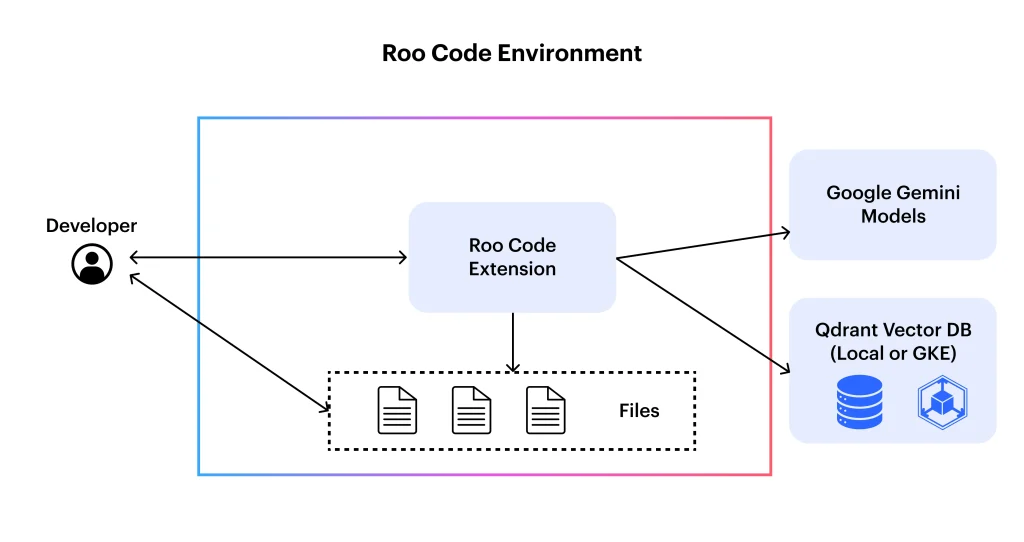
Overview:
Roo Code is an AI-powered coding tool designed to assist developers in writing, refactoring, and optimizing code. It acts like a virtual code partner, capable of handling complex programming tasks across different languages and frameworks.
Key Capabilities:
It excels in automating repetitive coding tasks, generating full features, debugging intelligently, and suggesting optimized solutions. The Roo Code also integrates with popular IDEs for easy workflow support.
Whom it is Built For:
Roo Code is mainly targeted at software engineers, full-stack developers, and teams looking to accelerate the development cycle and automation of routine tasks.
Pros and Cons:
- Pros: High autonomy, fast feature generation, robust debugging.
- Cons: May require oversight for safety-critical code and can be resource-intensive.
Supported Workflows:
Roo Code supports multi-step feature builds, end-to-end project automation, and collaborative coding workflows, making it ideal for modern agile teams navigating Roo Code vs Cline scenarios.
What is Cline?
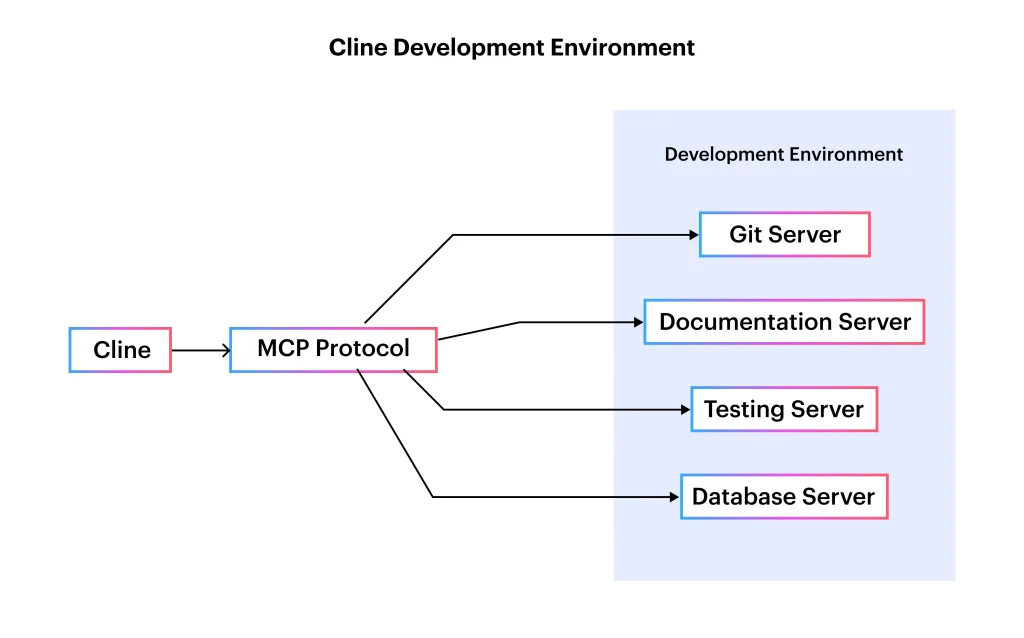
Overview:
Cline is an AI coding agent built for precise, step-by-step code execution. Unlike fully autonomous agents, it mainly emphasizes transparency, safety, and developer oversight, making it perfect for controlling coding environments.
Key Capabilities:
Cline excels in command-level guidance, error detection, code review suggestions, and safe refactoring. It makes sure that every change is predictable and can be easily audited.
Whom it is Built For:
Cline is perfect for developers, QA engineers, and teams that prioritize controlled automation and need AI assistance without relinquishing full coding control.
Pros and Cons:
- Pros: High predictability, strong safety measures, and clear traceability.
- Cons: Slower than fully autonomous agents, may require more manual intervention for large projects.
Supported Workflows:Cline supports incremental coding, command-based debugging, and collaborative review workflows, positioning it as a practical choice in Cline vs Roo Code discussions.

Roo Code vs Cline: Head-to-Head Comparison
The debate around Roo Code vs Cline reflects on two different philosophies in modern AI-driven development workflows. Roo Codes primarily focuses on high autonomy and large-scale execution, whereas Cline mostly emphasizes control, safety, and transparent decision-making.
For teams adopting next-gen AI solutions, understanding their differences is important.
1. Feature-wise:
Roo Code automates entire feature builds and multi-step workflows, acting like a junior engineer. And Cline gives controlled, common-level assistance with zero predictable actions.
2. Speed & Accuracy:
Roo Code delivers faster execution for large tasks due to its autonomous design. On the other hand, Cline prioritizes accuracy through step-by-step approval, ensuring fewer surprises during implementation.
3. Safety & Control:
In this feature comparison, Cline wins in safety, giving complete transparency and permission-based operations. Roo Code is surely safe, but it gives the agent more freedom, requiring occasional oversight.
4. Engineering Complexity:
Roo Code handles various complex, multi-layered engineering tasks with ease, such as scaffolding and architectural updates. Clines focuses on simple, incremental tasks that reduce the risk of errors.
5. Debugging Workflows:
Roo Code performs automated debugging and patch generation. Cline assists interactively, explaining issues and allowing developers to approve the fixes.
6. Application-Building Capabilities:
The Roo Code can build all the full features, modules, and even small applications end-to-end. Cline supports smaller, controlled iterations rather than full automation in the project.
7. Ease of Integration with IDEs & Terminals:
Roo Code integrates tightly with coding environments for fluid development. Cline works best in terminals and VS Code extensions with clear command flows.
8. Local vs Cloud Operations:
Roo Code supports both local and cloud models, depending on the setup. Cline mainly runs locally, giving developers maximum control and privacy in the project.
Roo Code vs Cline: Tabular Comparison
| Feature / Criteria | Roo Code | Cline |
| Approach | Autonomous, multi-step execution | Controlled, step-by-step approval |
| Speed | Faster for large, complex tasks | Slower but more precise |
| Accuracy | High, but requires oversight | Very high due to user-reviewed actions |
| Safety | Moderate, agent-driven | Strong, permission-based |
| Control | Low to medium | High |
| Debugging | Automated bug detection and fixes | Interactive debugging with explanations |
| Project Handling | Can build full features/modules | Supports smaller, incremental tasks |
| Engineering Complexity | Handles complex workflows | Best for simpler, controlled tasks |
| IDE Integration | Strong multi-IDE support | Strong in Terminal and VS Code |
| Local vs Cloud | Works locally and in cloud setups | Primarily local for privacy and control |
| Best For | Fast development, automation-heavy teams | Developers who want precision and oversight |
This table highlights the core differences between Roo Code and Cline, making it easy to evaluate which align better with your development workflow. Roo Code is ideal for rapid, autonomous feature development, while Cline suits teams that prioritise safety and transparency.
For businesses exploring advanced automation or custom tooling, choosing the correct agent is a key part of modern AI integration services.

When to Use Roo Code?
It is important to understand where Roo Code shines for developers, so it is essential to choose the right AI assistant when comparing Cline vs Roo Code. Roo Code is built for speed, autonomy, and big-scale execution, making it ideal when you need an AI agent that can operate like a hands-on coding partner.
Best Scenarios:
Use Roo Code when you need rapid feature development, multi-step automation, or help building full modules. It’s especially effective during sprint-heavy cycles where speed and output matter more than manual oversight.
Real Examples:
Deploy Roo Code to generate API endpoints quickly, scaffold complete components, set up project structures efficiently, or automate repetitive refactoring across large codebases. Teams focused on MVPs or quick iteration gain from their autonomy.
Limitations:
Roo Code might struggle in safety-critical areas or highly sensitive codebases where each change must be fully audited. It also requires more resource allocation and occasional supervision to make sure its large-scale changes align with engineering standards.
When to Use Cline?
Cline is the ideal choice for developers who prefer complete visibility and control over every AI-driven action. Unlike highly autonomous agents, Clines gives predictable, reviewable steps, making it a strong fit for teams adopting AI carefully or working alongside specialized LLM services that require precision.
Best Scenarios:
Use Cline when working on sensitive codebases, performing refactoring that demands accuracy, or managing workflows where each command must be carefully reviewed and approved. It is an excellent fit for developers who want AI support without giving up control.
Real Examples:
Cline is perfect for debugging line-by-line issues, reviewing code suggestions, improving test suites, and performing small but critical updates. The team can maintain legacy systems or compliance-heavy applications, and benefit from its step-by-step execution.
Limitations:
Cline might feel slower for large-scale tasks or full-featured builds, as it requires manual approval. It is not suited for heavy automation scenarios where rapid end-to-end execution is needed. For complex engineering tasks, the incremental style can also be limiting.
Additional Read: Llama.cpp vs Ollama: Choosing the Best Local LLM Tool in 2026
Roo Code vs Cline: Which One Should You Choose?
The criteria to choose between these two agents depend on your workflow, project complexity, and how much control you want over AI-driven actions. The real difference in Roo Code vs Clines comes down to autonomy versus precision.
Choose Roo Code if:
- You want fast, autonomous feature development.
- Your projects involve multi-step tasks or rapid prototyping.
- You prefer an AI agent that can build, refactor, and debug with minimal input.
Choose Cline if:
- You need transparent, permission-based execution.
- Your codebase requires high accuracy and auditability.
- You prefer step-by-step assistance and predictable changes.
Both tools are powerful; the right choice depends on whether you value speed or control.
Final Verdict: Decoding Your Best Option for AI-Driven Coding
Roo Code and Cline represent two different philosophies in AI-assisted development, one built for high-speed autonomous execution, the other designed for precision and control. Throughout this comparison, we explored their capabilities, workflows, strengths, and limitations, helping you understand where each tool fits best.
Whether you need rapid feature building, safer debugging, complex automation, or step-by-step coding support, both agents offer powerful advantages depending on your development style and project requirements.
At Openxcell, we help businesses harness the full potential of AI through tailored solutions, including AI services, AI agent development services, and enterprise-grade automation workflows. With our expert AI consulting services, we create custom coding agents that integrate with LLM-powered tools and optimize engineering pipelines to enhance developers’ productivity.
If you’re ready to elevate your software development with intelligent AI-driven workflows, our team is here to guide your transformation.

Frequently Asked Questions
1. What is the main difference between Roo Code and Cline?
The major difference between these tools lies in their autonomy versus control. Roo Code handles full, multi-step automation, where Cline gives safe, step-by-step execution. This contrast is central to the Roo Code vs Cline debate.
2. Which tool is better for beginners?
Cline is often easier for beginners because it offers clear, permission-based actions and predictable changes. Roo Code is powerful but may feel overwhelming initially.
3. Can both tools handle full-stack development tasks?
Cline is quite easy for beginners because it gives clear, permission-based actions and predictable changes. Roo Code is powerful but might feel overwhelming at the initial stage.
4. Is Cline safer for sensitive codebases?
Yes. Cline’s controlled workflow and approval-based steps make it ideal for compliance-heavy or mission-critical environments, which is a common discussion in Cline vs Roo Code comparisons.
5. Do these tools replace human developers?
No. They assist developers by automating repetitive tasks, improving accuracy, and speeding up builds. Human judgment, creativity, and architecture-level decisions remain essential.

Manushi, a former literature student, now crafts content as a writer. Her style merges simple yet profound ideas. Intrigued by literature and technology, she strives to produce content that captivates and stimulates.