Claude vs ChatGPT for Coding: Features & Use Cases
 Last updated:June 30, 2026
 13 Min Read
- What is Claude?
- Claude for Coding
- Key Benefits of Claude for Developers:
- What is ChatGPT?
- ChatGPT for Coding
- Key Benefits of ChatGPT for Developers:
- Key Features for Developers
- Claude – Developer-Oriented Features
- ChatGPT – Developer-Oriented Features
- Use Cases: Claude vs. ChatGPT in Real Development Scenarios
- Claude vs ChatGPT: Feature Comparison Table
- Performance Comparison for Coding Tasks
- Code Generation Quality
- Error Detection & Debugging
- Refactoring & Clean Code
- System Design & Architecture
- Where Both AI Coding Assistants Fall Short
- Pricing & Accessibility: Choosing the Right Plan for Your Development Needs
- When to Choose Claude?
- When to Choose ChatGPT?
- Additional Factors Developers Should Consider
- Final Verdict: Claude vs ChatGPT for Developers


The "Cheat Sheet" Points
- The Powerhouse: Claude wins on the basis of context 1M tokens and multi-file logic, which is ideal for the “big picture” in engineering.
- The Speedster: ChatGPT leads in versatility, offering real-time web search and advanced reasoning for complex algorithms.
- The Interface: Choose Claude vs ChatGPT for coding based on your UI preference: Claude’s Artifacts is perfect for visual previews vs ChatGPT’s Canvas for inline document editing.
Imagine it’s 3:00 AM, and you have been chasing a memory leak for five hours, but your last three cups of coffee have failed you. In 2026, we don’t just Google it; you turn to your AI pair programmer. But who is sitting in the passenger seat? But then the real question comes up: which AI tool are you relying on to solve the problem?
A recent industry data shows that while there are 84% of developers use AI daily, they might split down the middle: 45% of professionals have migrated to Claude for its surgical precision, while ChatGPT remains the most used tool globally with over 800 million active users.
The debate of ChatGPT vs Claude for coding has moved beyond simple syntax; it is now a simple battle between Claude’s massive ” one million token” memory and ChatGPT’s high-reasoning “Thinking” models. In this blog, we will move past the marketing hype to see which AI services and which tool actually helps you ship production-ready code faster.
What is Claude?
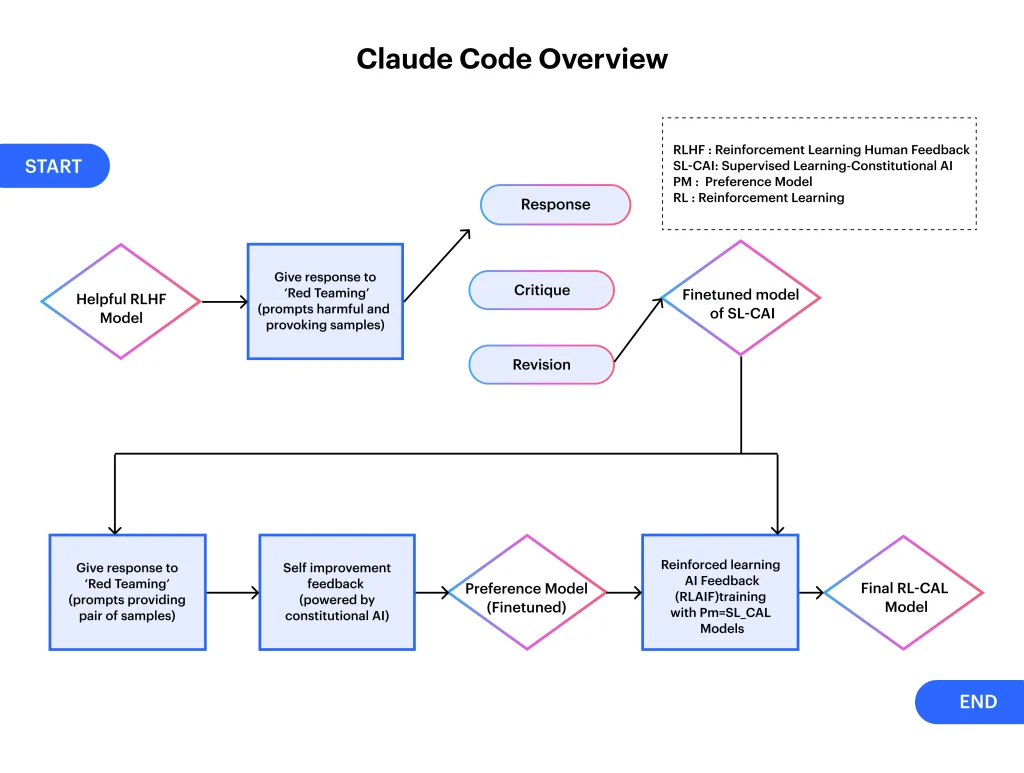
As we know, Claude is an advanced AI model developed by Anthropic, but what we didn’t know is that it is purposefully designed to provide thoughtful reasoning, structured responses, and high context understanding. It is built with a strong emphasis on reliability and clarity. Claude is known for processing large volumes of information while also maintaining logical consistency, making it valuable for technical and analytical tasks.
Claude for Coding
When it comes to Claude’s development workflows, it performs strongly in code review, refactoring, and documentation generation. In this discussion around Claude AI vs ChatGPT for coding, Claude is mainly recognized for its ability to analyze long code files and give well-structured explanations.
Key Benefits of Claude for Developers:
- Handles large codebases efficiently
- Provides detailed reasoning behind suggestions
- Produces clean, structured documentation
- Supports multi-language coding tasks
- Strong contextual understanding for complex logic
We can say that Claude is perfect for developers who prioritize clarity, depth, and structured problem-solving.
What is ChatGPT?
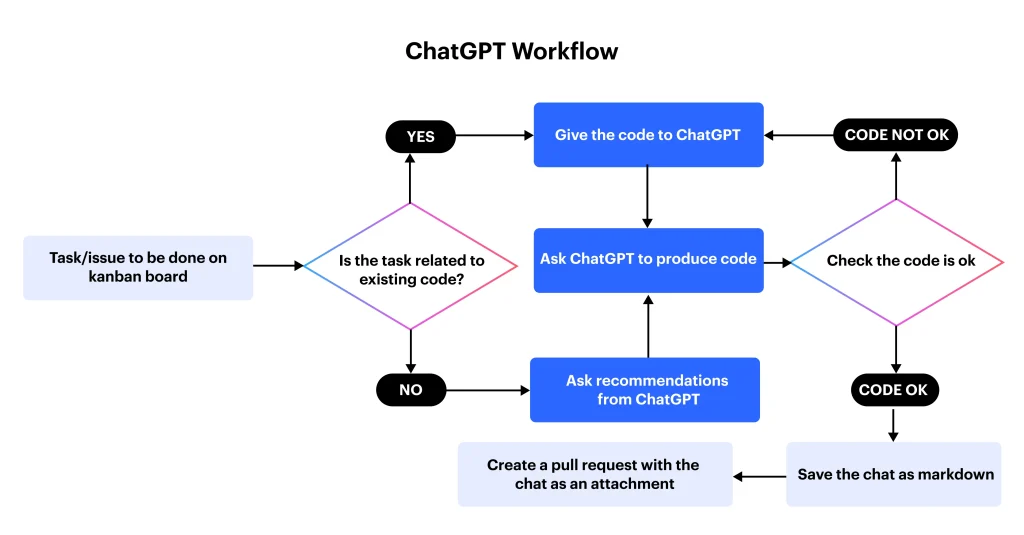
In today’s day and age, we all have heard of ChatGPT, right? It is an advanced AI assistant developed by OpenAI, designed to understand prompts, generate human-like responses, and assist across a wide range of tasks, including complex tasks such as software development. It is powered by cutting-edge language models. ChatGPT has become a go-to tool for developers and businesses using Gen AI integration services for fast coding, debugging, and problem-solving.
ChatGPT for Coding
If you ask any developer, ChatGPT is like an on-demand coding partner. In the discussion of Claude vs ChatGPT for coding, ChatGPT is praised mainly for its speed, hands-on debugging support, and practical implementation guidance. It supports many programming languages, frameworks, APIs, and DevOps workflows.
Key Benefits of ChatGPT for Developers:
- It gives fast debugging and error resolution
- Step-by-step coding guidance
- Boilerplate and test case generation
- Strong ecosystem integrations
- Helpful for learning new frameworks
ChatGPT is ideal for rapid development, experimentation, and real-time coding assistance.
Related Read: ChatGPT vs Gemini vs Claude: Who Leads the AI Race?
Key Features for Developers
When we talk about building the next-gen software, it is always emphasized that the tool you choose should complement your team’s specific workflow. In 2026, the battle of ChatGPT vs Claude for coding and Gen AI development is not about who can write the loop faster; it is more about specialized features that cater to different engineering requirements.
Claude – Developer-Oriented Features
Claude has carved out a niche as the “thoughtful architect” of AI assistants. We often recommend it for projects where precision and deep context are non-negotiable.
- Large Context Window: Its ability to process up to 1 million tokens makes it the go-to for analyzing massive, multi-file repositories without losing the thread.
- Structured Responses: It consistently delivers well-organized, markdown-heavy outputs that are easy to parse and integrate.
- Complex Logic Reasoning: Claude’s “Thinking” mode allows it to solve intricate architectural puzzles by evaluating edge cases before it ever writes a line of code.
- Safe Handling: Its Constitutional AI framework ensures that sensitive logic or proprietary prompts are handled with higher guardrails.
- Clean Explanations: It doesn’t just give you a fix; it provides a high-level overview of why the change was made, which is great for team learning.
- Documentation Drafting: It excels at turning messy code into professional, readable technical docs or READMEs.
Best For: Deep code reviews, refactoring legacy systems, high-level architecture discussions, and summarizing long technical specs.
ChatGPT – Developer-Oriented Features
ChatGPT remains the “Swiss Army Knife” for developers who need speed, versatility, and an integrated ecosystem to move from idea to execution instantly.
- Strong Debugging: Its specialized Canvas editor allows you to highlight specific errors and get real-time, inline suggestions to squash bugs fast.
- Multi-language Support: It has a vast training set that makes it exceptionally reliable across nearly every obscure or modern programming language.
- Tool Integrations: From GitHub to VS Code plugins, ChatGPT fits seamlessly into the tools your team is already using.
- Step-by-Step Guidance: Perfect for a “tutor” experience, breaking down complex deployments into manageable, sequential tasks.
- Improvement Suggestions: Beyond just writing code, it proactively suggests ways to make your boilerplate more performant.
- Test Case Generation: It’s incredibly fast at generating unit tests and edge-case scenarios to ensure your code is production-ready.
- API & SDK Examples: Need to know how to use a specific library? ChatGPT pulls real-time examples and documentation snippets in seconds.
Best For: Rapid prototyping, learning new frameworks, quick-fix debugging, generating boilerplate code, and DevOps scripting.
Use Cases: Claude vs. ChatGPT in Real Development Scenarios
When developers choose an AI strategy, they must consider their specific bottlenecks. In 2026, choosing between Claude vs ChatGPT for coding depends on whether you’re tackling a massive codebase or racing to launch a new feature. Here’s how these tools perform in actual development.
- Debugging Code: While ChatGPT is swift at catching syntax errors and offering quick fixes via its Canvas editor, we find that Claude acts more like a “Paranoid Senior Reviewer.” It’s often better at spotting subtle logic flaws and security vulnerabilities, like an unhandled edge case in an authentication flow.
- Large Codebase Review: This is where Claude truly shines for our clients. Thanks to its 1 million token context window, it can “read” your entire project at once. It understands how a change in your database schema might break a React component three folders away, something shorter-context models often miss.
- Writing Clean Documentation: Claude’s writing style is naturally more structured and technical. It’s our top pick for generating comprehensive READMEs and API docs that feel human-written, whereas ChatGPT is excellent at quickly generating boilerplate comments and JSDoc summaries.
- Learning & Tutorials: If you’re onboarding a junior dev or picking up a new framework like Svelte 5, ChatGPT is a fantastic tutor. Its “Thinking” mode (o1) breaks down why a framework works the way it does, offering a more conversational and encouraging learning path.
- Complex Logical Problems: For high-stakes algorithmic challenges, like optimizing a data processing pipeline, ChatGPT’s o1-reasoning models are currently the gold standard. They spend extra time “thinking” to ensure the logic is airtight before they start typing.
Claude vs ChatGPT: Feature Comparison Table
When Analytics Insight’s expert team evaluated the prospect of Claude AI vs ChatGPT for coding, they found out that it is always recommended to look at practical features side by side. As both tools are powerful for development tasks, their strengths are different depending on workflow, speed, and project complexity. Here’s a quick comparison to help you understand the differences clearly:
| Feature | Claude | ChatGPT |
| Developer Company | Anthropic | OpenAI |
| Coding Accuracy | High | Very High |
| Debugging Support | Strong reasoning | Faster practical fixes |
| Context Window | Very large | Large (model-dependent) |
| Documentation Writing | Excellent structure | Good but conversational |
| IDE Integrations | Limited native integrations | Strong ecosystem integrations |
| Multi-language Support | Broad | Broad |
| API Guidance | Strong | Very strong |
| Learning Support | Concept-heavy | Step-by-step friendly |
| Handling Long Files | Excellent | Good (may need chunks) |
Key Takeaways:
- The Claude performs better for structured reasoning and long-file handling.
- ChatGPT gives fast debugging and better, stronger ecosystem integrations.
- Both provide broad language support and reliable coding assistance.
Related Read: Claude Haiku vs Sonnet: How to Choose the Right AI Model
Performance Comparison for Coding Tasks
When clients evaluate Claude vs ChatGPT for coding, the performance is usually the deciding factor. Now it is about generating code, accuracy, reasoning, scalability, etc., and how well the tool supports real development workflows. Based on developers’ projects and practical testing, here’s how both tools compare across critical coding tasks.
Code Generation Quality
Claude and ChatGPT both generate production-ready code across multiple languages. In the debate between Claude AI vs ChatGPT for coding, Claude produces more structured, readable outputs, while ChatGPT tends to deliver faster, implementation-focused solutions.
Error Detection & Debugging
ChatGPT is typically quicker at identifying common syntax and runtime issues. Claude, however, provides deeper reasoning and clearer explanations behind complex bugs.
Refactoring & Clean Code
Claude excels at reorganizing messy or legacy code into clean, maintainable structures. ChatGPT is highly effective for quick optimizations and improving efficiency.
System Design & Architecture
For architecture discussions, Claude offers detailed, well-structured reasoning. ChatGPT helps brainstorm practical approaches and alternative implementation strategies efficiently.
Where Both AI Coding Assistants Fall Short
As we compare ChatGPT vs Claude for coding, it is equally important to understand both the tools’ limitations. No AI tool is perfect, and knowing these gaps helps set realistic expectations and use them more effectively in development workflows.
Claude Limitations
- Fewer integrations in developer ecosystems: Claude currently offers limited direct IDE and plugin integrations compared to other tools.
- Sometimes overly verbose: It may provide longer explanations than necessary for simple coding fixes.
- May be conservative in coding suggestions: At times, it avoids bold or unconventional solutions, especially in edge cases.
ChatGPT Limitations
- May hallucinate APIs if prompts are unclear: It might occasionally suggest nonexistent methods or outdated libraries.
- Context limitations depending on model tier: ChatGPT handles very large files, which may require splitting inputs.
- Sometimes prioritizes speed over depth: Quick answers may lack detailed reasoning.
Understanding these limitations ensures smarter, more strategic AI use.
Pricing & Accessibility: Choosing the Right Plan for Your Development Needs
As we select an AI coding assistant, the pricing and accessibility are major factors, mainly for startups, enterprises, and growing tech teams. There are beyond features; it is important to evaluate subscription tiers, API access, scalability, and enterprise readiness before making a decision.
Here is the high-level price comparison.
| Free Tier | Limited usage access | Limited usage access |
| Pro / Individual Plan | Monthly subscription | Monthly subscription (Plus) |
| Team Plan | Collaboration-focused pricing | Team-based subscription |
| Enterprise Plan | Custom enterprise pricing | Custom enterprise pricing |
| API Access | Usage-based pricing (per token) | Usage-based pricing (per token) |
| Context Window | Very large context in advanced tiers | Larger context in higher tiers |
Key Takeaways from the Pricing Table:
- Free-tier plans are suitable for light or experimental usage.
- Pro plans work well for individual developers who need consistent access.
- Team & Enterprise plans are ideal for companies that need collaboration, security, and scalability.
- API pricing is usage-based for both, making the cost dependent on volume.
- Higher-tier plans generally unlock larger context windows and better performance.
Ultimately, the right choice depends on your project scale, usage frequency, and integration needs.
Additional Read: 15 Best AI Tools for Developers in 2026 [Free and Paid]
When to Choose Claude?
In 2026, Claude is the preferred choice for developers who want to tackle high-stakes engineering and where structural integrity is paramount. Its design emphasizes meticulous reasoning and expansive memory, making it the “Senior Architect” of the AI world.
- Large-Scale Repo Management: With a 200k context window, Claude can “read” your entire project at once, ensuring that new code doesn’t break existing dependencies in distant files.
- Deep Debugging: It excels at tracing complex logic errors and “ghost bugs” by providing step-by-step reasoning rather than just guessing a fix.
- Clean, Idiomatic Code: Claude is widely recognized for writing more “human” code, prioritizing readability, proper naming conventions, and modern best practices over quick boilerplate.
- Direct Terminal Interaction: Using Claude Code, the model can autonomously run tests, execute commands, and manage multi-file edits directly in your local environment.
Summary: It is important to choose Claude for complex, multi-file projects where accuracy and maintainable architecture are non-negotiable. It has a massive context window and superior reasoning, making it the gold standard for full-stack engineering and deep technical problem-solving in 2026.
When to Choose ChatGPT?
ChatGPT remains the most undisputed champion of versatility and speed, serving as the ultimate multitool for rapid development. As the ChatGPT vs Claude for coding debate continues, developers choose ChatGPT when they need to move fast, experiment broadly, and integrate with a massive ecosystem of tools.
- Rapid Prototyping & Ideation: It has an instant mode that provides near-zero latency, making it perfect for generating boilerplate code, small scripts, and finding workarounds during early-stage builds.
- Massive Integration Ecosystem: ChatGPT shines with deep native support for VS Code, JetBrains, and GitHub, alongside Operator agents that autonomously navigate your browser or local OS to execute tasks.
- Multimodal Development: The code involves generating assets; ChatGPT’s native DALL-E and Sora integrations allow creating UI placeholders, marketing images, or social media video clips without even leaving the chat.
- Interactive Learning & Debugging: The “Canvas” and “Prism” workspaces allow you to edit code in-line and see live previews of React components or data visualizations in a dedicated, split-screen environment.
Summary: Choose ChatGPT for high-velocity tasks, creative brainstorming, and projects requiring rich multimedia or third-party integrations. It is the best choice for “vibe coding” and rapid iteration, where speed and the ability to leverage a broad AI ecosystem outweigh the need for deep, multi-file architectural analysis.
Additional Factors Developers Should Consider
- Real-World Developer Testimonials In recent surveys, 85% of engineers reported that Claude vs ChatGPT for coding isn’t about choosing one, but using Claude for complex refactoring and ChatGPT for rapid front-end prototyping.
- Benchmark Examples Industry standard tests like SWE-bench Verified show Claude 4.5 achieving 95% functional accuracy, while ChatGPT 5.2 leads in polyglot performance across 50+ niche languages.
- Security & Data Privacy Claude is often preferred in regulated industries due to its “Constitutional AI” framework, while ChatGPT offers robust Enterprise “Zero-Retention” modes for proprietary codebases.
- Open-Source Ecosystem Support OpenAI continues to lead in community-driven plugins, whereas Anthropic focuses on deep integration with open-source terminal agents like Aider and Claude Code.
- Future Roadmap & Innovation The next frontier is “Agentic Workflows,” where your AI doesn’t just suggest code but autonomously manages your CI/CD pipelines and fixes bugs while you sleep.
Final Verdict: Claude vs ChatGPT for Developers
Till now in this blog, we have explored Claude vs ChatGPT for coding from a practical developer’s perspective, covering features, use cases, limitations, performance, pricing, and more. As Claude stands out for structured reasoning, long context handling, and documentation, ChatGPT excels in fast debugging, rapid prototyping, and hands-on coding support.
The right choice ultimately depends on your workflow, project complexity, and integration needs. It is important to unlock both tools’ potential; businesses must go beyond experimentation and strategically implement these models with expert-led Gen AI services.
At Openxcell, we help you to evaluate, integrate, and scale AI solutions tailored to your development goals, making sure they give measurable productivity and long-term impact.

Manushi, a former literature student, now crafts content as a writer. Her style merges simple yet profound ideas. Intrigued by literature and technology, she strives to produce content that captivates and stimulates.