Copilot vs Gemini: Side-by-Side Analysis for Coding and Productivity
 Last updated:December 26, 2025
 13 Min Read
- What Is GitHub Copilot?
- How GitHub Copilot Works
- Key Capabilities of Copilot
- Productivity Impact
- Best Fit For
- What Is Google Gemini?
- How Google Gemini Works
- Key Capabilities of Gemini
- Productivity Impact
- Best Fit For
- Copilot vs Gemini: Side-by-Side Comparison
- Copilot vs Gemini: A Practical Face-Off for Real-World Workflows
- Speed vs Depth
- Developer Experience
- Context Handling
- Workflow Coverage
- Learning Curve
- Team Collaboration
- Scalability of Use Cases
- Benchmarks & Performance Considerations
- Limitations, Risks, and Practical Trade-Offs to Consider
- Which Tool Is Better for Coding Efficiency?
- Making the Right Choice: Copilot vs Gemini


Executive Summary
- GitHub Copilot is created for speed, precision, and real-time coding assistance.
- Google Gemini mainly focuses on deep reasoning, large context, and cross-functional productivity.
- Copilot excels greatly in IDEs and day-to-day development tasks.
- Gemini shines in projects that involve documentation, planning, and complex workflows.
- In Copilot vs Gemini, choose Copilot for coding efficiency, or choose Gemini for context-rich productivity
Ever wondered if your AI assistant is actually helping you, or just staying up with you? With GitHub Copilot completing code at lightning speed and Google Gemini organizing notes, summarizing research, and generating ideas, it is easy to get lost in possibilities. But we all know the real goal is real productivity.
It is worth asking: Which AI partner should you trust for coding, creative, and research-heavy tasks?
In this evolving landscape, the comparison of Gemini vs Copilot becomes especially relevant in 2026. As both tools promise good productivity, they differ in how they support coding efficiency, context handling, and overall workflows. This blog will take a detailed dive into a side-by-side look at their capabilities, strengths, and ideal use cases to help developers and teams make informed choices.
For organizations investing in scalable innovation and AI development services, understanding these differences is key to building faster, smarter, and more efficient development processes.
What Is GitHub Copilot?
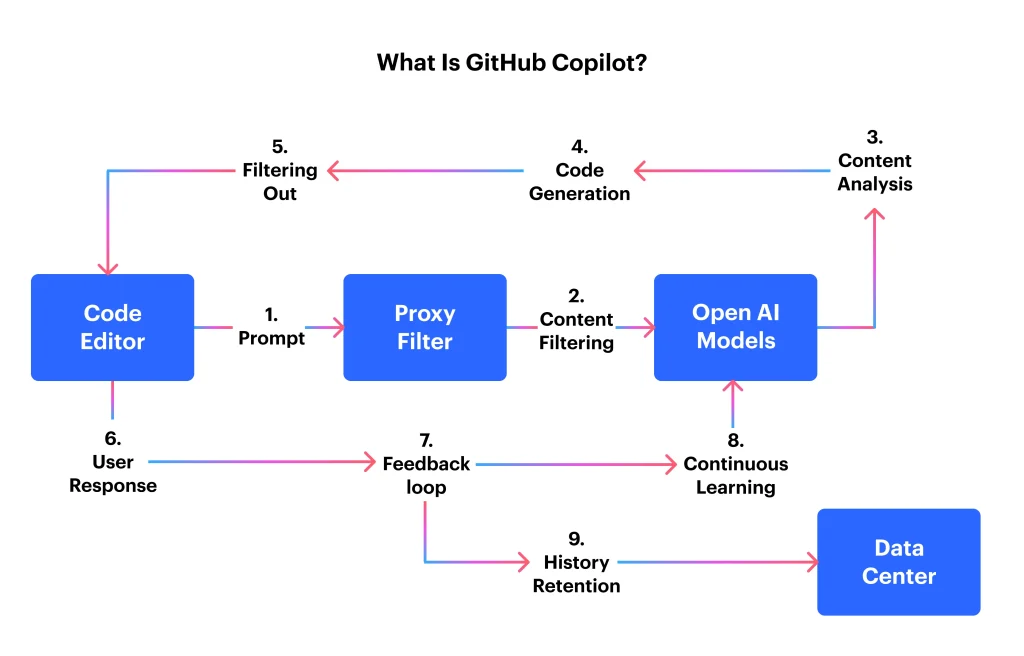
GitHub Copilot is an AI-powered coding assistant specifically built to help developers write better code more efficiently and faster. It is built specifically for software development workflows, integrating directly into popular IDEs and acting like an intelligent pair programmer.
It differs from general AI tools; Copilot is optimized for code accuracy, syntax awareness, and developer intent, making it particularly valuable for production-level development. As the discussion around Gemini vs Copilot continues, Copilot remains in a firm position as a developer-first solution focused on hands-on coding efficiency.
How GitHub Copilot Works
GitHub Copilot analyzes code in real-time by understanding the current file, including comments, function names, and the surrounding project context.
Based on these signals, it predicts the most relevant next lines of code and gives inline suggestions that can be accepted or modified according to your preference instantly.
Key Capabilities of Copilot
- Real-time code completion
It suggests the entire lines or blocks of your code as you type, significantly reducing repetitive effort.
- Natural language to code
Copilot converts simple comments into functional code, accelerating the scaffolding of features.
- Multi-language support
Works with a wide range of programming languages and frameworks without breaking workflow.
- Refactoring and optimization support
It amazingly helps in improving code readability, structure, and reuse without manual rewriting.
- Test and documentation assistance
GitHub Copilot generates unit tests and inline documentation to support maintainability.
Productivity Impact
GitHub Copilot greatly boosts productivity by minimizing manual coding tasks and reducing context switching. The developers can spend less time searching for syntax or examples and more time solving real-time problems.
They result in faster development cycles, improve code consistency, and better focus on high-value engineering decisions.
Best Fit For
Copilot is best suited for software developers and engineering teams who spend most of their time inside IDEs. It works mainly well for agile teams, fast-paced development environments, and organizations using GitHub-based ecosystems. The developers who look for speed, precision, and easy coding assistance will benefit most from Copilot.
What Is Google Gemini?
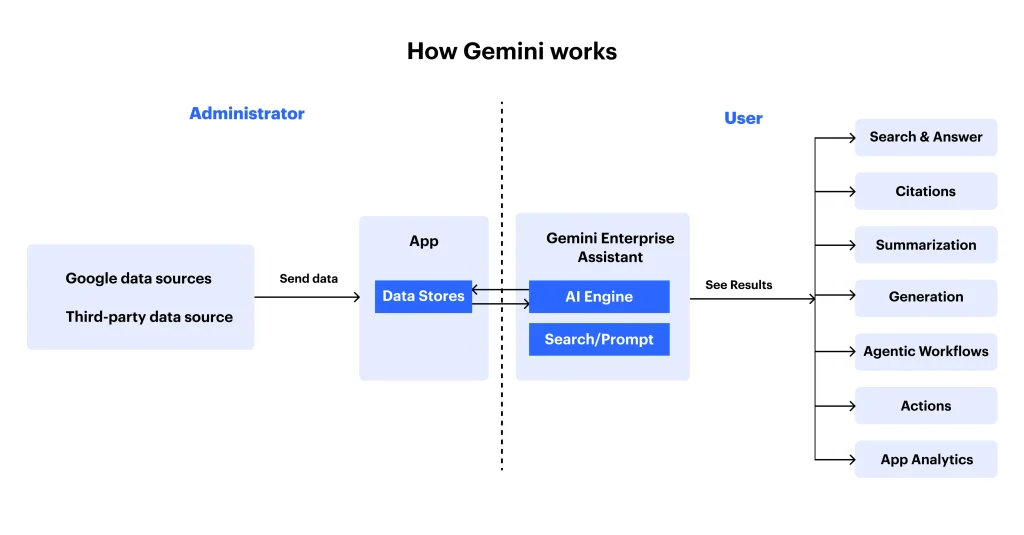
Google Gemini is a next-generation, multimodal AI assistant created to support a wide range of tasks like coding, research, content creation, analysis, and planning. It is also different from other tools; Gemini is built primarily for developers. It enhances holistic productivity, where users connect code with documentation, data, and the broader business context.
In discussions around Copilot vs Gemini, Gemini stands out for its ability to reason across complex, multi-source inputs, rather than focusing solely on inline code generation.
How Google Gemini Works
Google Gemini processes a large volume of data or information simultaneously, including text, code, documents, charts, images, videos, etc.
Gemini has an expansive context window that allows it to retain and reference details on entire projects, enabling deeper understanding and more informed outputs.
Key Capabilities of Gemini
- Context-aware code generation
Writes and explains code while considering surrounding documentation and requirements.
- Advanced reasoning and analysis
It breaks down complex problems, architectures, and workflows into logical steps.
- Multi-document understanding
Gemini connects insights from specs, PDFs, spreadsheets, and code repositories.
- Multimodal intelligence
Interprets and understands text, visuals, charts, and structured data in conjunction with one another.
- Workspace-level assistance
It integrates simply with Google Docs, Sheets, and your other productivity tools.
Productivity Impact
Google Gemini improves productivity by reducing fragmentation on different tools and tasks. Rather than switching between coding environments, documents, and research sources, users can rely on Gemini to synthesize all information in one place.
This leads to better decision-making, faster onboarding to complex projects, and improved collaboration between technical and non-technical stakeholders.
Best Fit For
Google Gemini is ideal for developers working on complex or large systems, product managers, cross-functional teams, analysts, or more. It is specifically effective in environments where coding is closely tied to documentation, planning, and research. The team that prioritizes deep understanding, context retention, and collaboration to gain more value from Gemini.
Copilot vs Gemini: Side-by-Side Comparison
Selecting between GitHub Copilot and Google Gemini becomes much easier when their capabilities are viewed side by side. As both tools are powered by advanced AI models, they are built with different priorities and usage patterns in mind.
One is deeply optimized for hands-on coding inside development environments, while the other focuses on broader productivity and contextual intelligence.
This comparison breaks down how the tools differ across key dimensions like focus, integration, ideal users, etc. Whether you’re evaluating tools for individual productivity or team-wide adoption, understanding these distinctions is important when considering Copilot vs Gemini in real-world workflows.
| Feature | Copilot | Gemini |
| Primary Focus | Coding efficiency | Overall productivity + coding |
| Core Strength | Real-time code generation | Deep reasoning & context |
| Best Use Case | Writing, completing, and refactoring code | Complex workflows involving code + docs |
| IDE Integration | Native IDE support | Limited IDE focus |
| Context Window | Moderate (code-centric) | Extremely large (multi-document) |
| Multimodal Support | Minimal | Strong (text, images, diagrams) |
| Ecosystem | GitHub | Google Workspace |
| Learning Curve | Very low for developers | Moderate for advanced prompts |
| Ideal Users | Developers & engineers | Developers, PMs, analysts |
| Productivity Style | Speed & precision | Insight & comprehension |
What the Comparison Reveals
- Primary Focus
GitHub Copilot is built with the same purpose of coding efficiency, where Gemini only balances coding with documentation, research, and planning.
- Core Strength
Copilot mainly excels in real-time code generation inside IDEs, while Gemini stands out for deep reasoning and long context understanding.
- Best Use Case
Copilot is perfect for writing, completing, and refactoring code, where Gemini greatly supports complex workflows involving multiple documents and tools.
- IDE Integration
The Copilot gives native, easy IDE support, while Gemini operates independently of development environments.
- Context Window
Gemini’s large context window enables handling multiple document inputs, whereas Copilot mainly focuses on local, code-centric context.
- Multimodal Support
The Gemini works with text, images, diagrams, and charts, giving them an edge in different workflows.
- Ecosystem Alignment
Copilot ultimately integrates deeply into the GitHub ecosystem, while Gemini integrates seamlessly with Google Workspace.
- Learning Curve
Copilot is an easy start for developers to adopt immediately, whereas Gemini rewards its users who master advanced prompting.
- Ideal Users
Copiloy mainly targets developers and engineers, while Gemini caters to many professions, like developers, product managers, and analysts alike.
- Productivity Style
Copilot emphasizes speed and precision, where Gemini prioritizes insights, comprehension, and context.
Additional Read: ChatGPT vs Gemini vs Claude: Who Leads the AI Race?
Copilot vs Gemini: A Practical Face-Off for Real-World Workflows
When it comes to comparing AI assistants, features alone don’t tell the full story. What truly matters is how these tools function or behave in day-to-day scenarios, how quickly they respond, how well they comprehend context, and how easily they integrate into real workflows.
This head-to-head breakdown looks beyond specs to examine how Copilot and Gemini perform where it counts the most.
Speed vs Depth
GitHub Copilot is designed for speed, providing instant, inline code suggestions that keep developers in a flow state.
Gemini, on the other hand, trades raw speed for depth, adopting a more thoughtful approach that excels when tasks require reasoning, synthesis, or interpretation across large inputs. This contrast often defines the core Copilot vs Gemini decision for users.
Developer Experience
Copilot provides a natural extension of the IDE, requiring minimal setup or learning, and suggests exactly where developers need it.
Gemini delivers a more conversational experience, acting like an intelligent collaborator rather than a background assistant, which makes you feel powerful but less immediate for pure coding tasks.
Context Handling
Copilot focuses on more local context, current files, and nearby code, making it perfectly effective for focused development work.
In contrast, Gemini excels at handling broader context exceptionally well, retaining information across documents, specifications, and lengthy conversations, which is ideal for understanding complex systems.
Workflow Coverage
Copilot stays tightly scoped to development environments, supporting writing, refactoring, and testing code.
Gemini spans a wider workflow, covering coding alongside documentation, research, analysis, and planning to make it more versatile for mixed role professionals.
Learning Curve
Copilot has a very low learning curve; developers can start using it immediately.
Gemini requires more intentional prompting to unlock its full potential, but rewards users with richer, more contextual outputs once it is mastered.
Team Collaboration
Gemini supports collaboration more naturally by bridging technical and non-technical work, helping teams to align code with requirements and documentation.
The Copilot mainly focuses on individual developer productivity rather than any cross-functional collaboration.
Scalability of Use Cases
The Copiloy scales amazingly with code volume and team size, making it a strong fit for fast-moving engineering teams.
The Gemini scale, which considers project complexity, supports use cases that grow in scope and information density, making it an important distinction in Google Gemini vs Copilot evaluations.
Bottom line: Copilot optimizes on execution speed and coding precision, while Gemini enhances understanding, reasoning, and workflow breadth. Overall, a Better choice depends on whether your daily challenges are code-heavy or context-heavy.
For example, in real-world AI implementations like the AI-Powered Credit Analysis platform developed by Openxcell, advanced AI models such as Gemini are used to automate complex financial workflows and deliver compliance-ready credit reports in minutes rather than days.
Benchmarks & Performance Considerations
When it comes to comparing AI assistants at scale, benchmarks matter more than just feature lists. The performance is defined not only by how fast the tool responds, but also by how consistently it gives accurate, context-aware output across real-world workloads.
In this ongoing debate of Gemini vs Copilot, understanding how each platform works under different conditions helps the teams to choose the correct assistant for daily productivity and long-term scalability.
Response Speed & Latency
- Copilot is optimized for low-latency interaction, which is particularly beneficial for use within IDEs such as VS Code and Visual Studio. The code suggestions appear almost instantly, making it perfect for rapid development cycles.
- Gemini might slightly be slower in response time, prioritizes depth and contextual reasoning, especially when handling multi-step prompts or large documents.
Accuracy & Output Quality
- Copilot is great at syntactically correct, production-ready code suggestions, mainly for common frameworks and languages.
- Where Gemini performs better in tasks requiring interpretation, summarization, and cross-referencing information from multiple sources, making more nuanced and explanatory outputs.
Context Window & Memory Handling
- Gemini’s large context window allows for processing extensive documents, datasets, multi-file workflows, and more without losing coherence.
- The Copilot, by design, maintains a narrower, code-centric context that improves precision but limits the broader reasoning across artifacts.
Scalability Across Workloads
- For small teams or individual developers, Copilot scales strongly with minimal setup and training.
- Gemini scales better at the organizational level, supporting analysts, product teams, and researchers who work across code, visual data, and documentation.
Multimodal Performance
- Gemini outperforms in multimodal benchmarks, handling text, images, diagrams, and charts within a single workflow.
- Copilot’s performance remains strongest in text-based code generation, with limited multimodal capabilities.
Enterprise Readiness & Reliability
- Both tools get benefits from their strong cloud infrastructure, but Copilot vs Google Gemini show a clear divide:
- Copilot integrates easily into heavy environments, while Gemini aligns naturally with Google Workspace and data-driven AI pipelines.
Overall Performance Takeaway
- Copilot benchmarks for speed, precision, and developer-focused execution. At the same time, Gemini leads in reasoning depth, contextual awareness, and versatility across complex, cross-functional tasks.
- The correct choice ultimately depends on whether performance is measured in milliseconds or in meaningful insights delivered at a scale.

Limitations, Risks, and Practical Trade-Offs to Consider
Some of the greatest AI assistants, like Copilot and Gemini, greatly accelerate work, but they do have some drawbacks. In real-world usage, especially when it comes to comparing Google Gemini vs Copilot, these tools reveal limitations that teams must factor into their adoption strategy.
Here are the most important risks and constraints:
- Context Gaps
Both Gemini and Copilot tools can misinterpret intent due to loosely defined prompts, leading to inaccurate or incomplete outputs.
- Over-Dependence on AI
These tools rely heavily on suggestions, which may reduce critical thinking, code review, and human judgment.
- Data Privacy Concerns
When using AI with proprietary code or sensitive documents, strict governance and compliance checks are necessary.
- Hallucinations & Logic Errors
Gemini may generate confident but incorrect or inaccurate explanations, while Copilot can suggest code that complies but might fail logically.
- Limited Domain Understanding
No tools can fully grasp niche industries, the business rules, or legacy systems without proper manual guidance.
- Inconsistent Output Quality
Results vary based on prompt clarity, task complexity, and available context.
- Ecosystem Lock-In
Copilot aligns closely with GitHub, while Gemini favors Google Workspace, which may limit flexibility.
- Advanced Usage Learning Curve
Basic features are intuitive, but extracting real value requires prompt engineering skills and workflow tuning.
In summary, Copilot and Gemini are best viewed as productivity accelerators rather than replacements for expertise.
Which Tool Is Better for Coding Efficiency?
| Aspect | GitHub Copilot | Google Gemini |
| Coding Speed | Fast inline suggestions and autocompletion | Slower, but offers reasoning across files |
| Accuracy & Precision | High accuracy for syntax and common frameworks | Context-aware, may require prompt refinement |
| IDE Integration | Native IDE support | Limited IDE integration |
| Best Use Case | Quick coding, refactoring, testing | Complex workflows with multi-document context |
| Ideal Users | Developers needing speed and precision | Developers, analysts, PMs needing context |
Summary: GitHub Copilot is perfect for rapid, precise code generation within the IDEs, while Google Gemini shines in projects that need broader context and cross-document reasoning. The best choice mainly depends on whether your priority is speed or contextual coding efficiency.
Related Read: Copilot vs ChatGPT: Which AI Assistant is Better?
Making the Right Choice: Copilot vs Gemini
In 2026, AI assistants will be the essential partner for productivity for both teams and individual developers. In this whole blog, we have explored GitHub Copilot and Google Gemini, highlighting their unique strengths in coding efficiency, context handling, and workflow integration.
As Copilot excels in generating fast and precise code within IDEs. Where Gemini shines in reasoning, multi-document analysis, and cross-functional collaboration.
Evaluating Google Gemini vs Copilot depends on whether speed or contextual intelligence matters most for your projects. At Openxcell, we help businesses to integrate the right AI tools into their workflows, maximizing efficiency and innovation across teams.


Manushi, a former literature student, now crafts content as a writer. Her style merges simple yet profound ideas. Intrigued by literature and technology, she strives to produce content that captivates and stimulates.