Llama.cpp vs Ollama: Choosing the Best Local LLM Tool in 2026
 Last updated:November 27, 2025
 10 Min Read
- Llama.cpp vs Ollama: Which One Should You Choose for Local LLMs in 2026?
- What is Llama.CPP and Its Role in Local LLMs
- What is Ollama and Its Role in Local LLMs
- Llama.CPP vs Ollama – Side-by-Side Analysis for Local LLMs
- Deep-Dive Comparison: Llama.CPP vs Ollama
- 1. Installation Experience
- 2. Ease of Use
- 3. Performance
- 4. Hardware Support
- 5. Model Management
- 6. API Support
- 7. Customization & Fine-Tuning
- Making the Choice: Llama.CPP or Ollama for Your LLM Projects
- Choose llama.cpp if you want:
- Choose Ollama if you want:
- Real-World Use Cases of Llama.CPP and Ollama
- llama.cpp
- Ollama
- Advancing AI Innovation with Confidence
- Key Questions About Llama.CPP vs Ollama


Comparing Llama.cpp vs Ollama ? Both offer powerful LLM capabilities in 2026.
Llama.cpp provides unmatched performance, full customization, and broad hardware support, while Ollama offers effortless installation, ready-to-use models, and a plug-and-play API, making it perfect for rapid prototyping and app development.
Did you know that there was a time when developers tried to run a 708 LLM on a laptop at 2 am, with no cloud, no internet, just raw device power? However, this is no longer the case, as by 2026, over 42% of developers will be running LLMs entirely on local machines to ensure privacy, reduce cloud costs, and boost performance.
As you have figured out, all these conversations are around Ollama vs Llama CPP, which is better for LLM. Both tools empower local LLM deployment, but are majorly different in performance and usability. For teams exploring next-gen AI development services, understanding these differences is important.
In this blog, we decode both technologies in depth, compare real-world performance, and help you choose the right stack for your on-device AI journey.
Llama.cpp vs Ollama: Which One Should You Choose for Local LLMs in 2026?
As AI adoption continues to rise locally, developers are increasingly evaluating lightweight, private, and high-performance ways to deploy LLMs on personal machines. In the Ollama vs Llama.cpp discussion, both tools have become industry favorites, each giving a unique approach to on-device inference.
- Llama.cpp is a highly optimized inference engine designed to run LLMs efficiently on CPUs and GPUs, even on low-power or edge devices. It is fast, flexible, and ideal for teams that want granular control over performance and custom setups.
- Ollama, on the other hand, focuses on simplicity. Its packaged models, one-command setup, and built-in API make it perfect for fast experimentation and app-ready integrations.
Choosing between Llama cpp vs Ollama comes down to priorities: maximum performance and customization, or effortless usability and rapid prototyping. Both are powerful, but your workflow determines which one truly fits your 2026 AI stack.
What is Llama.CPP and Its Role in Local LLMs
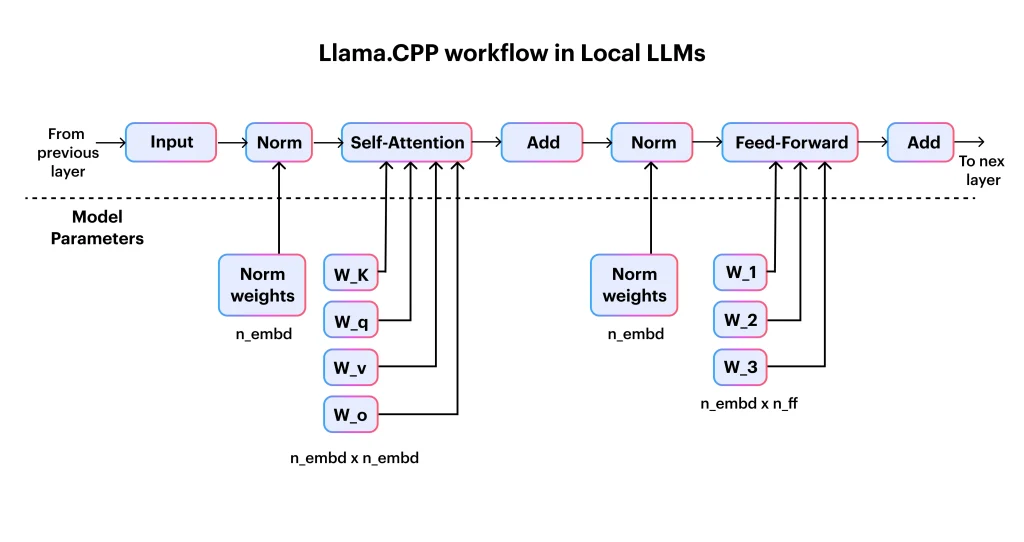
Llama. CPP is a greatly optimized, lightweight inference engine designed to run LLM directly on local hardware with exceptional speed and minimal resource usage.
It was originally created to make LLaMA models run effectively on consumer CPUs, but it has evolved into a core tool in LLM development, enabling developers to deploy these powerful models without relying on cloud GPUs.
Unlike the higher-level run times, Llama.CPP focuses on low performance, probability, and full control, making it a preferred choice in the Llama.CPP vs Ollama comparison for teams that value customization and edge deployment.
Key Features
- Extremely efficient CPU inference (SIMD-optimized)
- GPU acceleration via CUDA, Metal & Vulkan
- Runs on Windows, macOS, Linux, ARM, Raspberry Pi, and embedded devices
- GGUF model format
- Embedding generation
- Customizable context, layers, band matching
- Server mode for API-like usage
- Fully open-source with a massive developer community.
Llama.CPP’s flexibility and hardware reach make it ideal for both experimentation and production-grade local AI solutions.
What is Ollama and Its Role in Local LLMs
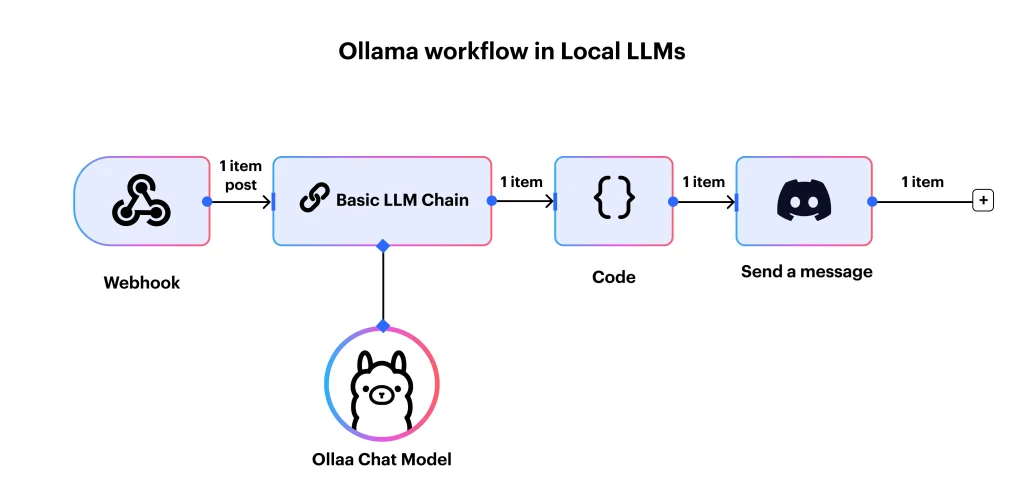
Ollama is a high-level LLM runtime made to make the running of local language models fast, simple, and developer-friendly. It is not like low-level inference engines.
Ollama gives a ready-to-use environment with pre-configured models, allowing users to deploy and experiment with LLMs without worrying about complex setup or hardware optimization.
This tool is particularly suited for developers, app builders, and teams using a plug-and-play solution for local AI workload, making the Ollama vs Llama cpp comparison essential for anyone evaluating ease of use versus performance.
Key Features
- Pre-configured model registry for instant access to popular LLMs
- Easy installation on Windows, macOS, and Linux
- Local REST API for app integration and rapid prototyping
- Support for custom model files and personal workflows
- GPU acceleration for enhanced inference speed
- Minimal setup, ideal for beginners and developers alike
Ollama’s streamlined design allows teams to quickly integrate LLMs into applications while maintaining local privacy and control, making it a go-to tool for rapid experimentation and app development.
Also Read: vLLM vs Ollama: Choosing the Right LLM Framework
Llama.CPP vs Ollama – Side-by-Side Analysis for Local LLMs
To help you quickly understand the key differences, here’s a comparison of Llama.CPP and Ollama, highlighting their features, performance, and ideal use cases.
| Feature | llama.cpp | Ollama |
| Type | Low-level inference engine | High-level LLM runtime |
| Ease of Use | Moderate | Very easy |
| Installation | Manual build or binaries | One-click installer |
| Model Support | Any GGUF model | Registry models + custom Modelfiles |
| Performance | Best CPU performance | Slight overhead |
| Hardware | CPU, GPU, ARM, Pi, embedded | CPU & GPU desktops/servers |
| API Support | Server mode | Built-in REST API |
| Customization | Extensive | Moderate |
| Deployments | Research, embedded, production | Prototyping, local apps |
| Fine-Tuning | External tools | Limited/experimental |
| Memory Usage | More efficient | Slightly higher |
| Who Should Use It | Developers, researchers | Beginners, builders, app devs |
Deep-Dive Comparison: Llama.CPP vs Ollama
It is important to choose the right local LLM tool depending on your workflow, hardware, and level of expertise. In this Llama.CPP vs Ollama comparison, we are here to break down seven main factors to help you decide which tool fits your AI stack and Gen AI service strategy.
1. Installation Experience
- Llama.CPP needs compiling from source, using prebuilt binaries, or manually downloading the GGUD model, making it ideal for developers comfortable with command-line setups.
- Ollama provides a one-click installation and a ready-to-run model registry, making it perfect for beginners or developers seeking fast experimentation.
Winner: Ollama
2. Ease of Use
- llama.cpp is CLI-driven and requires manual configuration of parameters, which adds flexibility but increases complexity.
- Ollama provides a simple CLI with auto-configuration and built-in model management, reducing setup time for app developers.
Winner: Ollama
3. Performance
- llama.cpp delivers best-in-class CPU performance with optional GPU offloading, keeping overhead minimal.
- Ollama, built on Llama.cpp incurs slightly higher overhead due to the wrapper, but remains highly performant.
Winner: Llama.CPP
4. Hardware Support
- Llama cpp runs on desktops, laptops, ARM devices, Raspberry Pi, and other edge devices.
- Ollama supports macOS, Windows, and Linux, but lacks embedded or ARM support.
Winner: Llama.CPP
5. Model Management
- Llama cpp requires manual model handling but supports any GGUF model.
- Ollama simplifies workflows with ready-made models and pull-and-run support for custom files.
Winner: Ollama
6. API Support
- Llama.CPP offers server mode via the command line, configurable by developers.
- Ollama includes a built-in local REST API for easy app integration.
Winner: Ollama
7. Customization & Fine-Tuning
- Llama cpp allows full parameter customization and external fine-tuning tools, giving maximum flexibility.
- Ollama’s customization is limited to early-stage fine-tuning support.
Winner: Llama.CPP
In the broader Ollama vs Llama.CPP debate, your choice depends on whether you prioritize simplicity and rapid prototyping or performance and deep control for local LLMs.

Making the Choice: Llama.CPP or Ollama for Your LLM Projects
It is essential to decide between local LLM runtimes, which can be challenging, especially when both give advantages. In the Llama vs Ollama debate, your choice should align with your priorities, whether you value raw performance, hardware flexibility, and research capabilities or ease of use, rapid prototyping, and ready-to-deploy APIs.
Choose llama.cpp if you want:
For teams focusing on performance and full control, Llama cpp gives a highly customizable and efficient environment for local LLMs. It is perfectly suited for projects where fine-tuning, CPU optimizations, and edge device deployment are important.
- Extreme performance: Optimized CPU inference with low overhead and optional GPU acceleration.
- Embedded-device support: It runs on ARM devices, Raspberry Pi, and other edge hardware.
- Full control over inference: Customize parameters, layers, and context for proper outputs.
- Custom quantizations: It has been tailored to strike a balance between speed and memory usage.
- Research-level flexibility: Ideal for experimentation, benchmarking, and novel LLM applications.
- Running LLMs on CPU primarily: Efficiently perform without relying on high-end GPUs.
Ideal for: Researchers, AI engineers, embedded developers, and performance-focused teams.
Choose Ollama if you want:
Ollama is built for simplicity and speed, making it an amazing choice for rapid development and prototyping. It is perfect for those who want a plug-and-play LLM experience without the need for complex setup or manual configuration.
- A plug-and-play LLM environment: It is a great Ready-to-use model with easy setup.
- Simple commands: Have a minimal CLI learning curve for faster adoption.
- Local LLM API for apps: Built-in REST API for seamless app integration.
- Fast prototyping: Quickly test models without manual downloads.
- Zero-setup experience: Start running models immediately after installation.
Ideal for: App developers, hobbyists, startups, prototypers.
Additional Read: LM Studio vs Ollama: Choosing the Right Tool for LLMs
Real-World Use Cases of Llama.CPP and Ollama
Both tools have excelled in different practical scenarios, making them valuable across development, prototyping, and deployment environments. It is important to understand where each shines to help clarify how projects benefit from their unique strengths, especially when comparing Llama.CPP vs Ollama for real-world apps.
llama.cpp
- On-device AI assistants: Power fast, private assistants without cloud dependency.
- Lightweight chatbots: Ideal for minimal-resource chatbots running locally.
- Raspberry Pi robotics: Enables smart robotics on low-power ARM devices.
- Enterprise offline AI tools: Supports secure, compliant environments with no internet access.
- RAG pipelines: Efficient local inference for retrieval-augmented generation workflows.
- Custom research work: Perfect for experimentation, benchmarking, and academic studies.
Ollama
Used widely in setups where simplicity, app integration, and rapid iteration matter most, positioning Ollama vs Llama cpp as a choice between ease and control.
- Desktop ChatGPT-like apps: It builds intuitive interfaces with local LLMs.
- RAG servers: Quickly deploy LLM-backed retrieval systems.
- Development/testing platforms: Streamlined model switching for prototyping.
- Embedding-powered search: Generate embeddings locally for search and ranking tools.
At Openxcell, we apply the same principles of efficient, scalable local LLM deployment discussed in this blog. Our AI-powered job portal, JobTatkal, uses advanced model integration and intelligent matching to streamline hiring, showcasing how real-world applications benefit from optimized LLM engineering.
Advancing AI Innovation with Confidence
In summary, this blog has explored the strengths, differences, and ideal use cases of both Ollama vs Llama.CPP, to help businesses and developers choose the right framework for local LM deployment. From performance and hardware needs to extensibility and ecosystem support, the comparison highlights how both tools help organizations to build efficient, secure, and scalable AI solutions.
Whether the team prioritizes portability, speed, or customization, choosing the right approach is key to future-ready AI adoption.
Openxcell empowers enterprises to bring these AI strategies to life with end-to-end LLM services, including custom ChatGPT development, model fine-tuning, RAG pipelines, AI integration, and on-device LLM deployment. With strong expertise in AI, data engineering, and automation.

Key Questions About Llama.CPP vs Ollama
1. Which is faster: llama.cpp or Ollama?
In most CPU-based setups, Llama cpp vs Ollama delivers superior raw performance, while Ollama adds a slight overhead for its simplified API and management features.
2. Can I fine-tune models using either tool?
Llama cpp allows fine-tuning with an external tool and gives complete parameter customization, whereas Ollama offers early-stage, limited fine-tuning, which is perfect for quick experiments.
3. Which is better for beginners?
For ease of setup and minimal configuration, Ollama vs Llama.CPP is the preferred choice, providing one-click installation and a ready-to-run model registry.
4. Does llama.cpp run on Raspberry Pi?
Yes, llama.cpp supports ARM devices like Raspberry Pi, making it ideal for edge and embedded applications.
5. Can I run Llama 3 70B locally?
Running extremely large models like Llama 3 70B locally depends on hardware; llama.cpp offers more control for CPU/GPU optimizations, whereas Ollama focuses on smaller, ready-to-use setups.

Manushi, a former literature student, now crafts content as a writer. Her style merges simple yet profound ideas. Intrigued by literature and technology, she strives to produce content that captivates and stimulates.