LM Studio vs Ollama: Choosing the Right Tool for LLMs
 Last updated:February 27, 2026
 8 Min Read
- Overview of the Platforms
- LM Studio
- Ollama
- Installation & Setup: Getting Up and Running with Ease
- LM Studio vs Ollama: Interface & Experience that Shape Workflow
- Strengths & Shortfalls: Evaluating LM Studio and Ollama
- LM Studio
- Ollama
- Model Compatibility & Availability
- LM Studio vs Ollama: Performance & Optimization
- Ideal Fit for Your Workflow
- Use Case-Based Recommendations
- Final Verdict on LM Studio vs Ollama: Which One Empowers You More?


Quick Glance
LM Studio and Ollama are two standout tools for running LLMs locally. One is built for simplicity with a GUI, and the other is for developers via CLI. This blog compares them across setup, usability, performance, and real-world use cases to help you choose the right fit for your workflow, whether you’re prototyping offline or integrating AI into full-scale applications.
Last week, a solo developer built a chatbot that amazingly mimics its brand voice entirely offline. No cloud costs, no latency, and no privacy risk. The secret? Choosing the right local LLM runner.
In the ever-changing dynamic world of AI development services, tools like LM Studio and Olama are empowering users to run large language models on their own machines with ease. But between LM Studio’s polished, GUI-driven experience and Ollama’s developers’ first CLI approach, which one truly delivers?
In this LM Studio vs Ollama showdown, we break down performance, usability, integration, and more to help you pick the ideal platform for your next AI project, whether you are building a personal assistant or powering an enterprise-grade application. But before that, let’s look at both LM Studio and Ollama.
Overview of the Platforms
With the rise of local LLM deployment, users can now have the power to run advanced language models directly on their own machines. In the Ollama vs LM Studio debate, both tools provide compelling approaches, but with different target users and operational styles. Here’s how it stacks up.
LM Studio
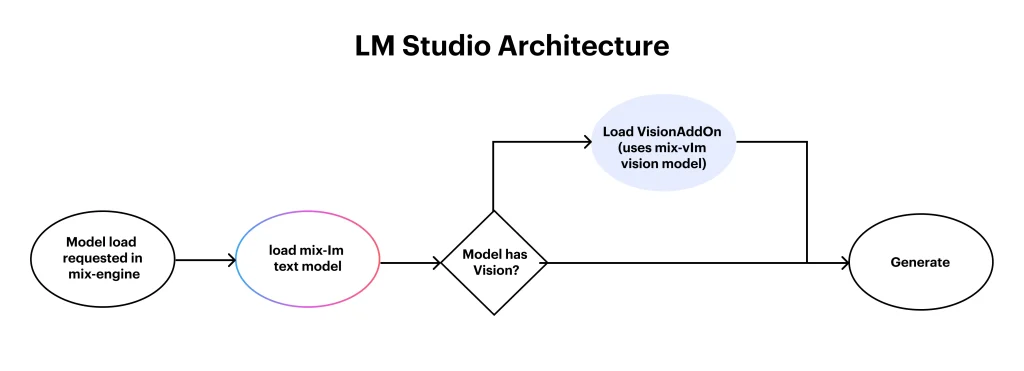
LM Studio is a desktop-based app that is designed to make running large language models locally as seamlessly as possible. With its clean graphical user interface, it caters to both beginners and professionals who prefer a no-code setup.
The LM Studio supports GGUF-formatted models and integrates with Hugging Face for quick model download. LM Studio uses the llama. Cpp backend to tune models efficiently and provides control over context size, temperature, and system memory use.
It is ideal for users focused on experimentation, offline use, or prompt engineering, with no technical skills required. LM Studio makes interacting with LLMs feel more accessible and intuitive than ever.
Ollama
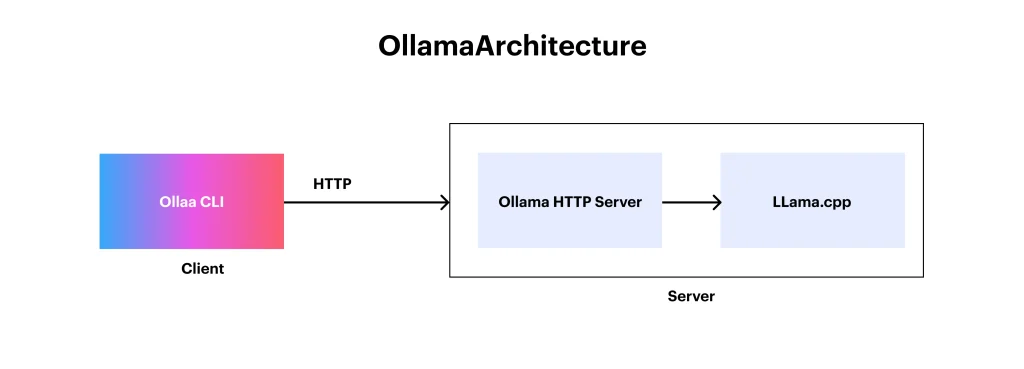
Ollama is a command-line-based LLM runner that prioritizes speed, integration, and flexibility. It is made for developers; Ollama allows you to run, manage, and customize language models through simple CLI commands, similar to using Docker.
It has features like built-in model packaging, making installation and updates effortless with Ollama run and Ollama pull.
Using a Model file, users can now fine-tune how models behave or chain them into pipelines. Powered by llama.cpp under the hood, Ollama provides fast, quantified models optimized for local inference. It is an ideal tool for those who want to embed LLMs into apps or integrate them into AI-powered services, data pipelines like HevoData, and workflows.
Understanding what each platform offers is just the beginning; how quickly you can bring them to life on your machine is where the real user experience begins. Let’s move into Installation and Setup to see which tool makes onboarding faster and more seamless.
Installation & Setup: Getting Up and Running with Ease
Before diving into features and performance, the first thing you need to learn is about real tests in the LM Studio vs Ollama comparison and how quickly and easily each platform gets up and running. For developers and beginners alike, installation can be either a breeze or a barrier. Here’s how they compare:
| Feature | LM Studio | Ollama |
| Platform Support | macOS, Windows | macOS, Windows, Linux |
| Setup | GUI installer, no CLI | CLI-based, requires a Terminal |
| Ease of Setup | Beginner-friendly | Developer-focused, simpler for devs |
- Platform Support: LM Studio supports Windows and macOS, whereas Ollama extends support to Linux, giving it an edge in developer flexibility.
- Setup: LM Studio uses a GUI installer, which requires no technical steps; Ollama, on the other hand, uses simple terminal commands for setup.
- Ease of Setup: LM Studio is ideal for nontechnical users. Ollama suits developers who are comfortable with command-line tools and scripts.

LM Studio vs Ollama: Interface & Experience that Shape Workflow
A platform’s interface mostly defines how smoothly users interact with large language models. In the LM Studio vs Ollama comparison, the experience varies mostly depending on your preferences and technical comfort. Here’s how each tool delivers
- LM Studio gives a clean, intuitive GUI with a built-in chat interface, making it perfect for users who prefer visual interaction over commands. It is ideal for experimentation, prompt testing, and local model exploration without writing code.
- Ollama, on the other hand, is built for developers who favor speed and control through the terminal. It has Docker-like commands and easy scripting options; it suits hands-on LLM development in integrated workflows or backend systems.
With the user experience defined, it’s essential to evaluate the strengths and limitations of each platform to better understand their practical value.
Strengths & Shortfalls: Evaluating LM Studio and Ollama
When it comes to running LLMs locally, both tools offer distinct advantages depending on the user’s needs. The Ollama vs LM Studio comparison highlights two different experiences, one designed for simplicity, the other for control and integration.
LM Studio
Pros:
- Clean, intuitive GUI ideal for non-developers
- No command-line knowledge required
- Quick setup with a built-in chat interface
- Supports local use without internet dependency
Cons:
- Limited automation or integration options
- Not designed for advanced development workflows
Ollama
Pros:
- Powerful CLI designed for developers
- Easy model management with Modelfile
- Ideal for integration into custom applications
- Lightweight and performance-optimized
Cons:
- Requires familiarity with terminal commands
- No graphical interface, which may deter casual users
Understanding the strengths of each platform sets the stage for another crucial factor, model compatibility and availability, which directly impacts flexibility and performance in real-world use.
“At Openxcell, we have seen firsthand how the right platform choice can shape outcomes. In our AI-based recruitment software, we use LLMs to power intelligent hiring, optimize candidate screening, and automate the decision-making process with impressive accuracy and speed.”
Model Compatibility & Availability
The true power of any LLM platform lies in the range of models it supports and how easily it can be deployed. In the Ollama v LM Studio comparison, both platforms add local LLM execution but differ in approach and flexibility.
| Feature | LM Studio | Ollama |
| Supported Models | GGUF format (Mistral, LLaMA, etc.) | Ollama’s own format supports LLaMA, Mistral, and Codellama |
| Model Download | Hugging Face integration | Built-in model registry (ollama pull) |
| Custom Model Support | Yes (manual) | Yes (via Modelfile) |
- Supported Models: LM Studio uses GGUF-formatted models, which provide wide compatibility. Ollama supports major models in its optimized format.
- Model Download: LM Studio merges directly with Hugging Face; Ollama facilitates it with one-command model pulls.
- Custom Model Support: Both support custom models, LM Studio through manual setup and Ollama via Modelfile configuration.
LM Studio vs Ollama: Performance & Optimization
More than features and interface, real-world usability comes from how efficiently each platform performs under pressure. From model loading speeds to system resource handling, the Ollama vs LM Studio performance comparison highlights key differences in optimization.
LM Studio focuses on simplicity with stable performance for offline tasks, testing, and prototyping. While it’s not optimized for big-volume processing, it handles single-model interaction smoothly with minimal configuration.
Ollama is built for speed and control; it’s a CLI-based design offering lightweight execution and faster model loading. With Modelfile optimization and low memory overhead, it’s more suitable for running LLMs in development environments or integrated workflows where performance matters most.
An Interesting Read: LLM Security: Protecting AI Models from Attacks & Data Leaks
Ideal Fit for Your Workflow
Different tools serve different purposes. Whether one is experiencing it locally or deploying it in an AI-ready workflow, aligning platform capabilities with goals is essential. From offline exploration to model chaining, every platform has its strengths.
LM Studio is ideal for:
- Local testing and prototyping without Internet access
- Exploring prompts and LLM behavior in a GUI
- Lightweight experiments with manageable LLM Parameters
- Non-developer use in educational environments
Ollama is ideal for:
- Scripting and chaining models in developer workflows
- Seamless integration into apps or backend systems
- Projects needing fast, repeatable deployments
- Fine-tuning and customizing LLM pipelines using Modelfile
Your choice depends on whether you prioritize ease of use or integration depth.
Use Case-Based Recommendations
Selecting between platforms mainly depends on the user’s goals, whether they are learning, experimenting, or deploying, based on typical usage patterns. Here’s how the tools, along with real-world needs, are compared in the LM Studio vs. Ollama comparison.
| Use Case | Recommended Tool |
| Beginners, educators | LM Studio |
| Local LLM testing | LM Studio |
| Devs building apps with LLMs | Ollama |
| API integrations & pipelines | Ollama |
| GUI-based prompt engineering | LM Studio |
| CI/CD and deployment environments | Ollama |
- LM Studio is excellent for learning, testing, and prompt crafting in a GUI.
- Ollama excels in developer environments, integrations, and automation.
The right choice depends on whether ease or extensibility is your top priority.
Final Verdict on LM Studio vs Ollama: Which One Empowers You More?
Choosing between LM Studio vs Ollama mainly comes down to your workflow needs and technical comfort. LM Studio shines for users seeking a smooth, GUI-based interface perfect for offline testing, education, and quick prototyping.
On the other hand, Ollama is built for developers who need performance, control, and easy model deployment into scripts, apps, or production pipelines. Whether you are exploring LLMs or embedding them into your stack, picking the correct tool isn’t just a preference but a productivity multiplier.
At Openxcell, we bridge that gap. Our expertise in LLM development, custom AI solutions, enterprise-grade integration, and more will help you make sure that your platform, be it LM Studio or Ollama, delivers your real business value.


Manushi, a former literature student, now crafts content as a writer. Her style merges simple yet profound ideas. Intrigued by literature and technology, she strives to produce content that captivates and stimulates.