Cursor vs Copilot: A Complete Breakdown of AI Coding Tools
 Last updated:October 1, 2025
 8 Min Read
- GitHub Copilot: The AI That Started It All
- Cursor: The Next-Gen AI-Powered IDE
- Major Feature Comparison: Cursor vs Copilot in Action
- 1. Code Completion & Generation
- 2. Speed & Performance
- 3. Context & Codebase Awareness
- 4. Flexibility & Models
- 5. Editor vs Standalone IDE
- 6. Pricing & Usage Limits
- Cost Breakdown: Is It Worth the Price?
- What Developers Are Saying: Real Feedback from the Trenches
- Practical Applications: Real World Use Cases
- Cursor vs Copilot: A Side-by-Side View
- Conclusion: Choosing the Right AI Coding Assistant


Imagine this: you are racing against a tight work deadline, debugging lines of code till midnight, and your IDE suggests the exact function you required. Well, it’s not magic, it’s the power of AI coding assistants. As AI services are reshaping how developers write, review, and deploy code, choosing the correct tool has never been more critical.
In fact, as per Stack Overflow’s 2024 developers survey, over 55% of professional developers use AI-powered code suggestions regularly.
This brings us to the ongoing and growing debate of Cursor vs Copilot. Both tools promise to supercharge productivity, reduce cognitive load, and accelerate software delivery, but which one truly delivers? Let’s find out!
So, whether you are a solo developer, a startup engineer, or part of an enterprise team, this comparison will help you pick the perfect AI assistant that fits in your workflow, long-term goals, and budget. Let’s break down how Cursor AI vs Copilot stack up in real-world development environments.
GitHub Copilot: The AI That Started It All
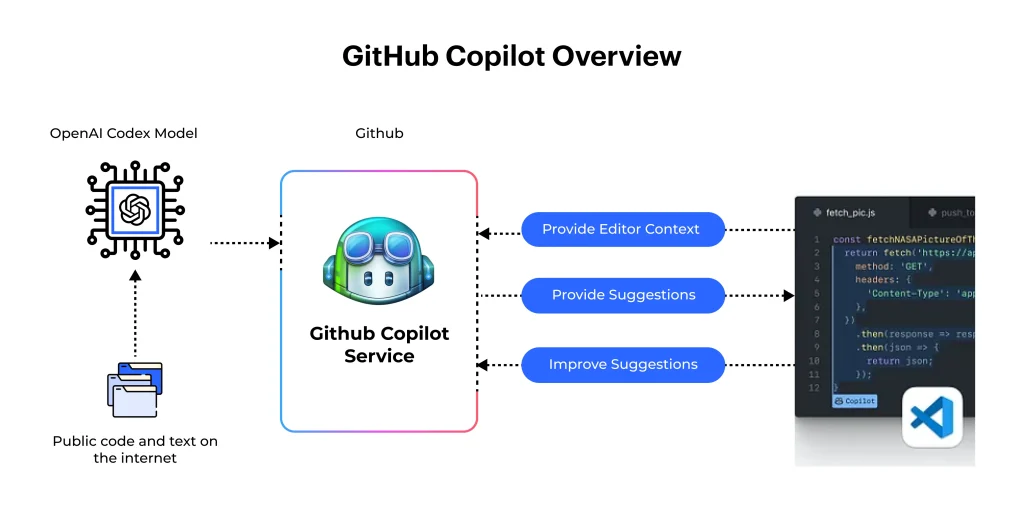
Launched in 2021 by GitHub and OpenAI, GitHub Copilot quickly became the gold standard for AI-assisted coding. It is integrated directly into popular code editors such as VS Code, JetBrains, and Vim. Copilot is designed to complete code snippets, suggest functions, and create entire blocks of logic, all based on natural language prompts or previously written code.
With strong community backing, regular model updates, and easy UX, Copilot has now become a go-to tool for developers looking to boost productivity with minimal setup.
Cursor: The Next-Gen AI-Powered IDE
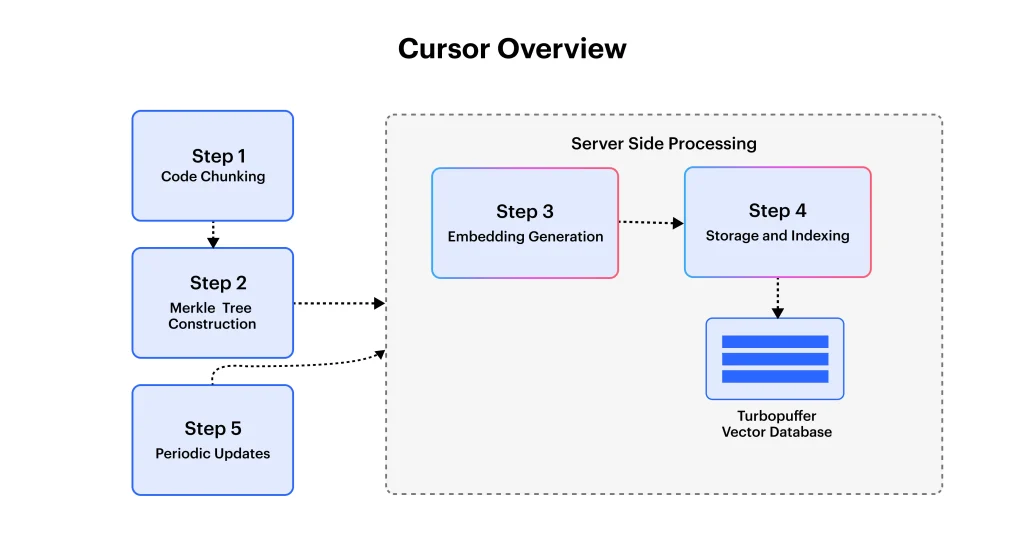
Cursor is a standalone IDR built on top of VS Code, launched in 2023 by Anysphere. More than just a plugin, Cursor provides complete development that is deeply integrated with advanced AI models like GPT-4, Claude 3.5, and Gemini. It gives code completion with file-aware codebase navigation, intelligent refactoring, and multi-model changing.
Cursor is designed for developers who want a fully AI-integrated coding experience rather than just a regular plugin-based assistant.
Major Feature Comparison: Cursor vs Copilot in Action
As the demand for smart development workflow grows, the debate between Copilot vs Cursor has become the center of discussion for AI coding assistants. Let’s explore how these two compare across the key dimensions.
| Feature | GitHub Copilot | Cursor |
| Code Completion | Inline suggestions for functions, loops, and logic in real-time | Multi-line + multi-file completions, auto-imports, code-aware generation |
| Speed & Performance | 890 ms average response time; stable and reliable | 320 ms response time; snappy due to optimized local caching |
| Codebase Awareness | Works mostly within a file-level context; “agent mode” adds some broader context | Deep codebase understanding; supports full-project Q&A, refactoring |
| Model Flexibility | Uses GPT-4; recent support for Claude & Gemini (limited customization) | Supports GPT-4o, Claude 3.5, Gemini; model chaining supported |
| Integration Style | Plugin for VS Code, JetBrains, Vim, Neovim, and others | Standalone IDE based on VS Code; full AI-native environment |
| Pricing | $10/month with generous usage limits | $20/month with capped premium usage; extra charges beyond quota |
1. Code Completion & Generation
Copilots excels in inline code suggestions, helping you finish the functions or loops as you type. Where Cursor takes it further with multi-line and multi-file completions, automatically handling imports and giving smarter context-driven suggestions based on the full codebase.
2. Speed & Performance
Cursor is known for its witty and snappy responses, averaging around 320ms for code completions, thanks to its optimized local context caching. While Copiolt is more reliable, it may lag slightly behind with response times closer to 890ms, especially in big projects.
3. Context & Codebase Awareness
Cursor shines in these areas as it has the ability to understand and modify the entire codebase. The developer can ask it to explain, refactor, or search across files using natural language, and it does the function excellently. Copilot, on the other hand, mostly operates within the open file context, but it is improving with the new “agent mode” feature.
4. Flexibility & Models
Cursor supports multiple AI models, allowing users to choose between GPT-4, Claude, or Gemini and even chain them for challenging tasks. Copilot primarily uses OpenAI’s models, with growing support for Claude and Gemini, but lacks the advanced chaining features found in Cursor.
5. Editor vs Standalone IDE
Copilot is a lightweight plugin that integrates smoothly into your favorite editor, giving convenience without a learning curve. Cursor is a full-fledged IDE that requires a separate installation but gives deep AI native capabilities in return.
6. Pricing & Usage Limits
Copilot offers a competitive $10/month plan with generous usage limits, while Cursor is priced at $20/month and charges for premium completions beyond a certain quota. Cursor offers richer features, but cost-conscious users may find Copilot more practical for day-to-day coding.
This comparison of Github Copilot vs Cursor highlights that while both tools aim to elevate your coding efficiency, their design philosophies and strengths cater to different developer needs.
Now that we’ve compared their features head-to-head, let’s break down how Cursor vs Copilot stack up in terms of pricing, value for money, and overall cost-efficiency for different developers.
Cost Breakdown: Is It Worth the Price?
When it comes to choosing between AI coding assistants, pricing plays an important role, especially for freelancers, startups, or teams scaling AI solutions.
In the battle of Cursor vs GitHub Copilot, both offer flexible pricing models, but their value depends on how extensively one codes and what features one prioritizes.
| Tool | Free Tier | Pro/Monthly Price | Limitations |
| Copilot | 50–12,000 free tokens | $10/month (~300 requests) | Unlimited fair use after quota (no extra fees) |
| Cursor | 200 completions/month | $20/month (500 premium requests included) | Extra per-request fees after the limit |
While Copilot provides predictable pricing with generous fair use, Cursor’s plan is better suited for developers who want premium features like full codebase awareness and model gain.
However, Cursors per request fees beyond the quota can add up quickly. For users seeking consistent value from their AI assistant, Copilot is actually more cost-effective, whereas Cursor appeals to those prioritizing advanced control over their development environment with rich AI features.
The choice of Cursor vs GitHub Copilot ultimately hinges on whether the developer is focused more on affordable or power-packed AI solutions.
What Developers Are Saying: Real Feedback from the Trenches
When it comes to real-world use of these AI assistants, developers’ sentiment often paints a clearer picture than feature lists. Many users praise GitHub Copilot for its stability, ease of integration, and reliable code suggestions. It is mainly praised for its minimal learning curve and consistency, especially for day-to-day tasks and smaller projects.
On the other hand, Cursor has built a loyal following among power users who value its deep codebase awareness, multi-file editing, and chat-like interactions. Moreover, many developers have noted issues with its autocomplete accuracy and occasional lag in big projects.
Overall, the Cursor AI vs GitHub Copilot comparison shows that while Copilot enjoys broader adoption, Cursor is quickly earning respect for its innovation and depth, mainly for its complex workflows and AI-native development steps.
Practical Applications: Real World Use Cases
Now, after learning all about AI assistants, understanding the real-world use cases helps clarify when to choose Copilot or Cursor. Whether you are building solo projects or managing large-scale enterprise codebases, both tools cater to different development needs. The Cursor AI vs. GitHub Copilot debate mostly comes down to specific workflows and team dynamics.
Here’s when to choose one over the other:
Use Copilot if:
- You need a lightweight assistant integrated into VS Code or JetBrains.
- You’re focused on rapid prototyping, scripting, or everyday coding tasks.
- Budget and ease-of-use are key priorities.
Use Cursor if:
- You manage large or complex projects with multiple files.
- You want advanced refactoring and full-codebase AI navigation.
- You prefer multi-model flexibility and deep IDE integration.
The Cursor vs Copilot decision ultimately depends on your coding environment and scale.
Cursor vs Copilot: A Side-by-Side View
To make an informed decision, it is important to evaluate both tools across critical functional areas. Below is a concise comparison of Cursor and GitHub Copilot in terms of performance, integration, and usability.
This Cursor AI vs. Copilot breakdown highlights where each tool shines and where trade-offs may apply.
| Feature | GitHub Copilot | Cursor |
| Inline completion | Fast, reliable | Multi-line “Tab” autocomplete |
| Multi-file refactoring | Limited to agent mode | Built-in smart rewrite |
| Codebase awareness | Evolving | Deep context and chat support |
| LLM model chooseability | GPT, Claude, Gemini | GPT-4o, Claude 3.5, Gemini (chainable) |
| Integration | Editor plugin | Dedicated IDE (forked from VS Code) |
| Speed | Slower suggestions (~890 ms) | Faster (~320 ms) |
| Memory use | Lean (~380 MB) | Heavier (~1.2 GB) |
| Price (Pro) | $10/month, unlimited fair use | $20/month + per-request charges |
| Community & support | Large, mature community | Growing rapidly, 70k+ members |
- Copilot stands out for its simplicity, editor-based setup, and cost-effective pricing, which are perfect for developers using quick productivity boosts.
- Cursor caters to advanced users with project-wide awareness, flexible LLM integration, and faster suggestions, albeit at a higher cost.
At the end, the right choice depends on your coding workflows, team scale, and appetite for deeper AI integration.
Conclusion: Choosing the Right AI Coding Assistant
The Copilot vs Cursor comparison reveals that both tools offer impressive abilities but serve different developer needs. While Copilot is cost-effective and easily integrates into existing editors, Cursor offers deeper codebase awareness and advanced automation through its dedicated IDE. Understanding their strengths is key to making the most of AI-powered development.
At Openxcell, we specialize in using advanced AI tools like Cursor and Copilot to organize development workflows. If you are looking to integrate intelligent coding assistants into your projects, our experts can help you make the correct choice and maximize productivity.


Manushi, a former literature student, now crafts content as a writer. Her style merges simple yet profound ideas. Intrigued by literature and technology, she strives to produce content that captivates and stimulates.