Cline vs Cursor: Choosing the Right AI Coding Companion
 Last updated:August 18, 2025
 8 Min Read
- What Is Cline?
- What Is Cursor?
- Cline vs Cursor: Side-by-Side Feature Analysis
- Feature-by-Feature Breakdown: Cursor AI vs Cline
- 1. AI Model Support
- 2. Integrations
- 3. Autonomous Capabilities
- 4. Ease of Use
- 5. Context Handling
- 6. Performance
- 7. Customization
- 8. Pricing Model
- Choosing the Right AI Coding Companion for Your Workflow
- Wrapping It Up: The Final Take on Cline vs Cursor


In the bustling world of AI and software development, speed and precision mostly decide whether a project soars or sinks. Over 92% of developers now use AI-assisted coding tools to reduce repetitive tasks, debug faster, and ship cleaner code, a trend that is now reshaping how teams work.
Amid this AI-powered revolution, two names that have been sparked over and over again are Cline vs Cursor. Both promise smart coding, seamless workflows, and fewer late-night bug hunts, but each takes a different route to work in the field.
In this blog, we will break down the strengths, weaknesses, real-world impact, and more to help you choose the right companion for your coding journey, as well as the right AI development services to amplify the potential.
What Is Cline?
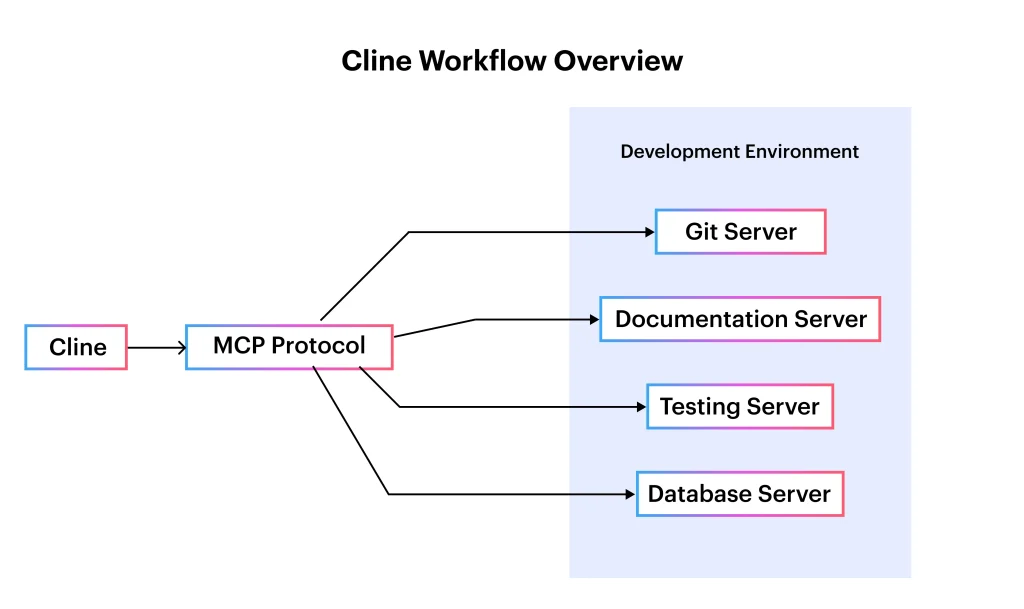
Cline is an open-source platform, an AI-powered coding assistant designed to act like a true development partner rather than just a suggestion engine. It is built for deep code understanding; it can read, interpret, and modify entire projects, not just single files.
The tool’s main purpose is to provide agent-like autonomy, executing terminal commands, refactoring code, integrating with project tools, and even running tests. This makes it a perfect choice for developers who want more than autocomplete.
In the Cursor vs. Cline debate, Cline stands out for its multi-code support and flexibility, providing integration with different large language models and workflows.
Key Features:
- Supports multiple AI models like Claude, GPT, and Qwen.
- Uses Model Context Protocol (MCP) for seamless integrations.
- Performs autonomous coding tasks without constant input.
- Handles multi-file context for large-scale changes.
- Open-source with a growing plugin ecosystem.
Pros:
- Highly customizable with model and plugin options.
- Strong multi-file understanding for better context.
- Open-source and transparent.
- Integrates easily with external tools.
- Automates repetitive coding tasks.
Cons:
- Steep learning curve for new users.
- Token-based pricing can get expensive.
- May slow down with very large files.
- Needs setup for best performance.
- Can lose context in complex scenarios.
What Is Cursor?
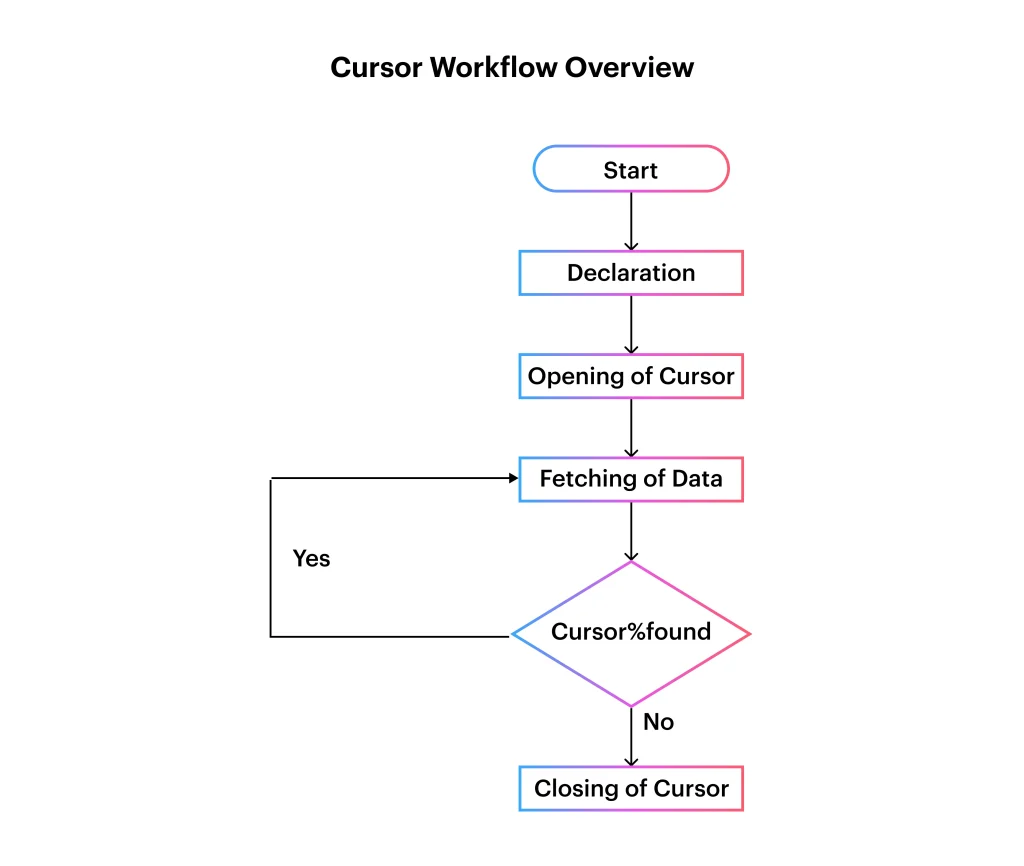
Cursor is an AI-first code editor built on a familiar VS Code foundation, made to do coding faster, cleaner, and more intuitively. Unlike traditional IDEs, it adds AI deep learning into the existing development process, giving instant code suggestions, automating refactoring, and context-aware completions.
The main purpose of tools is to organize the coding experience so developers can focus on problem-solving rather than wasting time on repetitive syntax or boilerplate code. In this Cursor AI vs Cline debate, Cursor is mostly praised for its polished user experience, speed, and stability, especially for handling big codebases with minimal setup.
Key Features:
- An AI-powered tool to autocomplete and provide inline code suggestions.
- Built-in refactoring, commit generation tools, and debugging.
- The tool works easily with large projects without performance drops.
- Familiar VS Code-like interface for easy adoption.
- It is a subscription-based model with predictable pricing.
Pros:
- Extremely easy to use with minimal onboarding
- Fast and responsive performance.
- The tool handles big projects smoothly.
- Gives clear and accurate code suggestions.
- Offers a polished and stable experience.
Cons:
- Limited AI model selection compared to Cline.
- Less customization and integration flexibility.
- Subscription fees can add up.
- Lacks deep autonomous coding capabilities.
- Advanced features require some setup.
An Interesting Read: Windsurf vs Cursor: Choosing the Right AI-Powered Code Editor
Cline vs Cursor: Side-by-Side Feature Analysis
Choosing between these two AI-powered coding tools mostly comes down to learning about what each brings to the table, as Cline gives unmatched flexibility, multi-model support, and deep integration capabilities, while Cursor focuses on speed, simplicity, and a polished coding experience.
This Cursor vs Cline comparison highlights the key features to help you decide which tool fits your workflow best.
| Feature | Cline | Cursor |
| AI Model Support | Supports multiple models like Claude, GPT, and Qwen, allowing flexibility for different tasks. | It primarily uses OpenAI models, which are optimized for speed and stability. |
| Integrations | Advanced integrations via Model Context Protocol (MCP) with CI/CD, Git, and testing tools. | Limited direct integrations, focused mainly on in-editor features. |
| Autonomous Capabilities | Can execute commands, run tests, and modify files without constant input. | It mainly assists through inline suggestions and refactoring prompts. |
| Ease of Use | Steeper learning curve, requires setup for full functionality. | Beginner-friendly, minimal setup, familiar VS Code-like interface. |
| Context Handling | Excellent multi-file and architectural context awareness. | Strong within single projects, but with less cross-project awareness. |
| Performance | It can slow down with very large files or heavy tasks. | Highly stable and fast, even with large codebases. |
| Customization | Highly customizable with plugins and open-source flexibility. | Moderate customization through editor settings and extensions. |
| Pricing Model | Token-based, variable daily cost depending on usage. | Fixed subscription (e.g., $20/month) with predictable pricing. |
Feature-by-Feature Breakdown: Cursor AI vs Cline
While comparing these tools, it is important to go beyond the surface and see how they differ in execution. In this Cursor AI vs Cline analysis, we will break down every core feature to highlight the practical benefits and trade-offs so you can make an informed decision.
1. AI Model Support
- Cline: Works with different AI models, giving flexibility for various coding and automation needs
- Cursor: Mainly relies on OpenAI models, known for optimized speed and consistent performance.
2. Integrations
- Cline: Operates on the Model Context protocol for advanced CI/CD, Git, and testing tool connections.
- Cursor: It has limited direct integrations, but it focuses on enhancing in-editor capabilities.
3. Autonomous Capabilities
- Cline: Can autonomously execute commands, run tests, and modify files with minimal human input.
- Cursor: Provides inline code suggestions and refactoring prompts without full autonomous execution.
4. Ease of Use
- Cline: Has a steeper learning curve, needs a proper setup to work with its full capabilities.
- Cursor: Easy for beginners, with minimal setup, and is familiar to VS Code users.
5. Context Handling
- Cline: Excellent at handling multiple files and architecture-wide context for complex projects.
- Cursor: Strong choice for single-project workflows, but less aware of cross-project dependencies.
6. Performance
- Cline: The Tool may slow down or glitch while processing big files or doing heavy automation tasks.
- Cursor: Maintains a high speed and stability throughout the process, even with the large codebases.
7. Customization
- Cline: It gives high customization with its plugins and an open-source framework.
- Cursor: Gives moderate customization via editor settings and extensions.
8. Pricing Model
- Cline: Token-based cost, which varies depending on daily usage.
- Cursor: Fixed monthly subscription (around $20) for predictable costs.
In the Cursor vs Cline discussion, Cline is a better choice for developers who want advanced integrations, flexibility, and autonomy, while Cursor appeals to developers who want simplicity, speed, and stability in a known coding environment.
Additional Read: Claude Code vs Cursor: A Deep Dive into Features & Use Cases
Choosing the Right AI Coding Companion for Your Workflow
Now we are down to finally deciding between AI-powered coding assistants; understanding your needs is the key. While Cline vs Cursor is a popular comparison, as we have learned till now, both cater to slightly different audiences. Your choice depends on whether you value deep automation and integrations or a smooth beginner-friendly coding boost.
Pick Cline if you…
Cline indeed shines for autonomous coding; it is capable of executing commands, timing tests, and integrating with platforms like GitHub Actions, Docker, or Jenkins. It is perfect for advanced developers working with large multi-file projects. AI model experimentation and deep customization through plugins are similar to how tools like Tabby or Codeium target power users.
Pick Cursor if you…
Cursor is perfect if you prefer intuitive learning, with a VS Code-like interface and minimal setup. It is best for teams that need consistency, stable inline assistance, quick refactoring, and performance in large codebases, much like how GitHub Copilot and AWS CodeWhisperer appeal to developers focused on reliability and speed.
| Choose Cline If | Choose Cursor If |
| You want multi-model AI support | You want speed & stability |
| Need deep CI/CD integrations | Prefer minimal setup |
| Require autonomous execution | Need inline coding help |
| Value open-source flexibility | Want predictable pricing |
Similar Read: Cursor vs Copilot: A Complete Breakdown of AI Coding Tools
Wrapping It Up: The Final Take on Cline vs Cursor
At the end, Cursor vs Cline both tools bring their unique strengths to the table. One shines with its simplicity and tailored AI integration for particular workflows, while Cursor stands out for its collaborative, real-time coding and debugging features. Choosing between them ultimately depends on your workflow, project needs, and the level of AI automation you are aiming for.
To give you an idea, Openxcell specializes in helping businesses work with the right AI-powered tools and custom solutions. From Gen AI services to bespoke integration, we enable teams to work smarter, more innovatively, and faster, effortlessly. Whether implementing tools like Cline or Cursor or building your AI-powered platform from scratch, we work with it.


Manushi, a former literature student, now crafts content as a writer. Her style merges simple yet profound ideas. Intrigued by literature and technology, she strives to produce content that captivates and stimulates.