Windsurf vs Cursor: Choosing the Right AI-Powered Code Editor
 Last updated:October 15, 2025
 8 Min Read
- What is Windsurf?
- What is Cursor?
- Windsurf vs Cursor: Feature by Feature Comparison
- 1. UI & UX
- 2. Code Generation & Completion Quality
- 3. Context Handling & Codebase Understanding
- 4. AI Chat & Interaction
- 5. Speed & Performance
- 6. Debugging & Code Review
- 7. Pricing & Plans
- 8. Special/Unique Features
- 9. Customization & Extensibility
- 10. User Experience & Learning Curve
- 11. Integration & Ecosystem
- Final Thoughts: Picking the Right AI-Powered Coding Companion


In the IT industry, coders are at the center of focus and are always overloaded with work, so there are now new tools for them; they are not just code editors, but they’re partners. These tools autocomplete your thoughts, catch bugs before you do, and sometimes learn new tricks on their own. In this new wave of smart coding environments, two names are creating quite a buzz: Windsurf vs Cursor.
Now that AI-driven development has become the norm, the demand for intelligent editors has skyrocketed. In fact, recent studies show that over 70% of developers now prefer editors that enhance AI for code quality and efficiency. It is no surprise that tools that offer integrated AI services are stealing the spotlight.
Now, in the blog, we will choose between Cursor vs Windsurf, which truly elevates your coding game? Let’s learn about their key differences, strengths, and which one deserves a spot in your dev toolkit.
What is Windsurf?
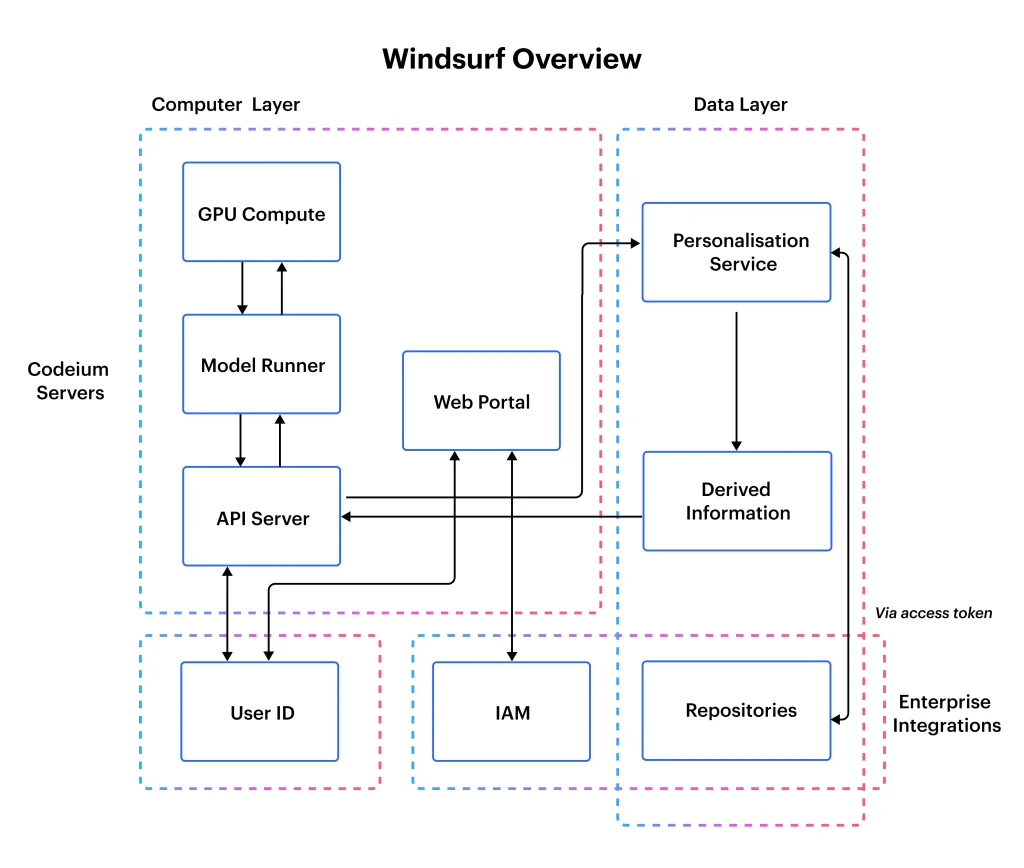
Windsurf is a new-age, modern AI-powered code editor created for developers who value real-time collaboration, speed, and an intuitive developer experience. It is tailored for fast-paced environments and blends the flexibility of a lightweight editor with the intelligence of an AI assistant, making it perfect for startup companies and product teams looking to iterate quickly.
Windsurd integrates AI-driven suggestions directly into your workflow. It provides a cloud-based, multiplayer coding environment where multiple developers can collaborate live, share sessions instantly, and provide contextual code complements. One doesn’t need to manage complex setups or sync issues; Windsurf keeps everything fast, smooth, and synced in real time.
Key Features:
- Real-time collaborative editing
- AI-based code completion and debugging
- Built in terminal and version control
- Easy integrations with GitHub and VS Code extensions
Pros:
- Great for remote team collaboration
- Lightweight, browser-based interface
- Fast performance even on low-resource systems
Cons:
- It is still evolving; there are some advanced features missing
- Limited offline functionality
When doing a Cursor vs Windsurf comparison, Windsurf stands out for its focus on team-centric workflows. In the broader Windsurf vs Cursor debate, it’s a top pick for collaborative, real-time coding.
What is Cursor?
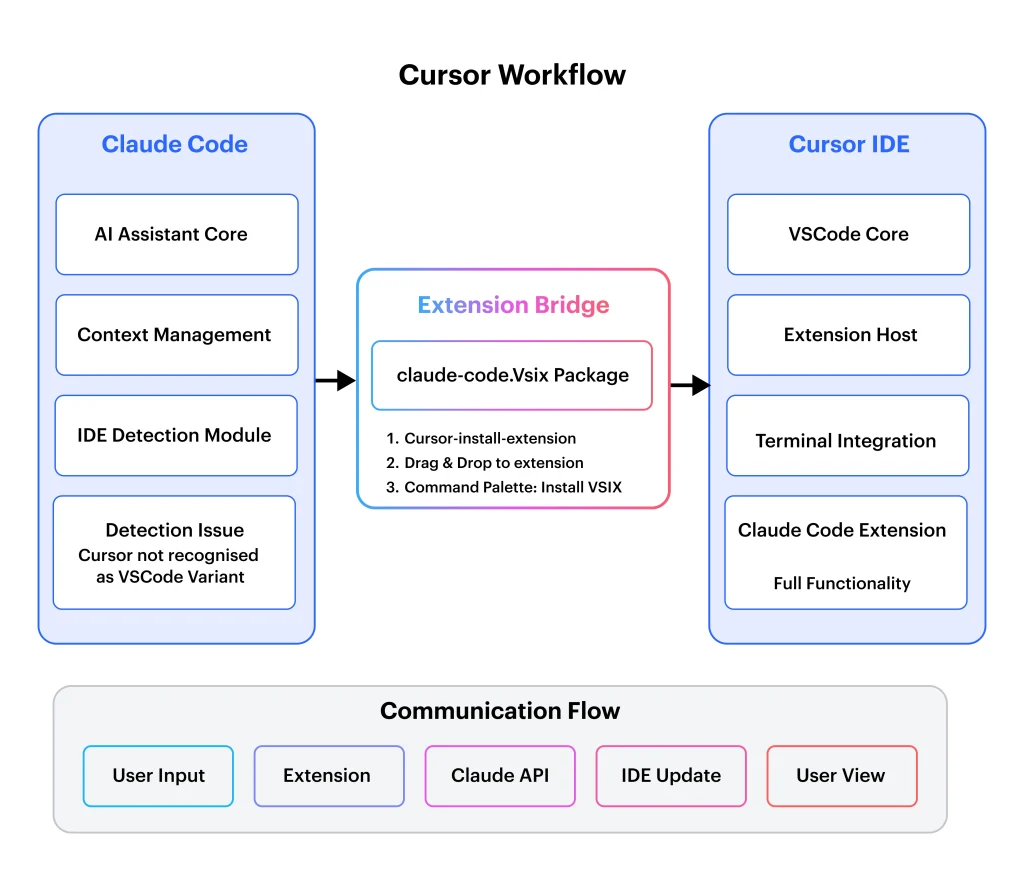
In the Cursor AI vs Windsurd debate, Cursor is an AI-first code editor built on top of Visual Studio Code, built to help developers with faster and smarter coding assistance directly into the development environment. It is especially favored by small teams or solo developers who want deep AI support without switching away from familiar workflows.
Cursor operates by embedding a contextual AI assistant in your code editor. The tools help you understand the entire code, make new code, easily explain complex logic, and even fix bugs with minimal inputs. Since it is based on VS Code, it retains all the extensions and customizations developers like while layering on a sleek AI experience that feels native and not forced.
Key Features:
- The AI chat assistant directly integrates into the editor
- Whole codebase search and understanding
- Inline suggestions and bug fixing
- The tool gives full compatibility with VS Code extensions
Pros:
- Powerful AI-driven support for individual devs
- Smooth learning curve with VS Code base
- Works well with large codebases
Cons:
- Lacks native real-time collaboration
- Heavier on system resources than browser-based tools
Cursor definitely shines in AI depth and solo productivity. For those comparing Windsurf vs Cursor, it’s the go-to when precision and personal coding flow matter the most.
Additional Read: Cursor vs Copilot: A Complete Breakdown of AI Coding Tools
Windsurf vs Cursor: Feature by Feature Comparison
When it comes to choosing an AI code generator, it often comes down to details. While both tools are powerful, their strengths lie in different areas. In this Windsurf vs Cursor comparison, we break down each tool’s capabilities across essential features to help you decide which one best suits your workflow.
| Feature | Windsurf | Cursor |
| UI & UX | Minimal, clean, browser-based interface | Familiar VS Code UI with AI enhancements |
| Code Generation & Completion Quality | Fast, good for short blocks and patterns | Deep, contextual, and highly accurate suggestions |
| Context Handling & Codebase Understanding | Basic context awareness for live files only | Strong whole-codebase understanding and navigation |
| AI Chat & Interaction | Simple AI assist, not full chat capability | Full AI chat assistant integrated in-editor |
| Speed & Performance | Lightweight, fast in the browser | Powerful but can be heavier on system resources |
| Debugging & Code Review | Manual debugging with collaborative review | AI-assisted bug fixing and code explanation |
| Pricing & Plans | Free (beta phase), paid tiers expected | Freemium model with Pro features available |
| Special/ Unique Features | Real-time team collaboration, multiplayer coding | Deep AI understanding and in-line conversational assistance |
| Customization & Extensibility | Limited extensions, currently in early stages | Full support for VS Code extensions and themes |
| User Experience & Learning Curve | Very easy to start, ideal for teams | Easy for VS Code users, but deeper features need exploration |
| Integration & Ecosystem | GitHub, terminal, limited integrations for now | Broad ecosystem support via VS Code compatibility |
Both Windsurf and Cursor have their own unique strengths at the table. Whether you are a solo developer or a part of a collaborative team, choosing the correct tool depends on what features matter most to your workflow. Here is the detailed breakdown of how each tool performs across key areas.
1. UI & UX
Windsurf gives a clean, browser-based interface that is lightweight and distraction-free. It feels intuitive for new users and perfect for remote teams working together in real time.
Cursor, on the other hand, retains the familiar Visual Studio Code layout, which is great for seasoned developers. It easily blends familiarity with new AI tools, keeping the learning curve minimal.
2. Code Generation & Completion Quality
Windsurf provides solid AI suggestions for common patterns and smaller code blocks. This tool is fast and reactive, but it is still maturing in depth.
Cursor excels with more advanced code generation; it delivers highly contextual, precise completions that understand surrounding logic and structure, making it perfect for complex projects.
3. Context Handling & Codebase Understanding
Windsurf handles immediate file context greatly during a live collaboration session, but it doesn’t deep dive into the full project structure.
Cursor stands out with its whole codebase awareness. It will reference and reason across files, giving smart suggestions based on broader context, which makes it highly efficient for large codebases.
4. AI Chat & Interaction
Windsurf includes light AI interactions with inline suggestions but lacks a full AI chat experience for deeper queries.
Cursor features a strong in-editor AI chat. It helps developers to ask questions, generate functions, and debug through conversations, giving a hands-on AI partner for coding.
5. Speed & Performance
Windsurf is a cloud-based tool; it runs smoothly even on low-resource machines, making it ideal for lightweight setups or coding on the go.
Cursor runs locally and can be heavier on CPU and RAM, especially on large projects. However, its performance is optimized for advanced users with more resource-intensive workflows.
6. Debugging & Code Review
Windsurf currently relies more on manual debugging, though it adds quick team-based code review through its live collaboration.
Cursor uses AI to detect and fix bugs, explain logic, and suggest improvements, making the debugging experience smoother and more productive for solo developers.
7. Pricing & Plans
Windsurf is right now in beta and free to use, with paid plans expected in the future. It is a great time to explore the tools and capabilities before pricing tiers roll out.
Cursor gives a freemium model; its core features are available for free, while premium plans unlock deeper AI interactions, longer context windows, and more compute power.
Also Read: How Can Generative AI Be Used In Cybersecurity: Use Cases, Risks & More
8. Special/Unique Features
Windsurf shines for its real-time multiplayer editing. The teams can easily code simultaneously in the same session, making it a good choice for remote or pair programming workflows.
Cursor’s strength lies in its deep AI integration and ability to interact with code like a teammate. Features like in-line AI chat, full codebase analysis, and conversational debugging give it a unique edge.
9. Customization & Extensibility
Windsurf currently has limited support for extensions as it is still in the development process. However, it covers the essentials like GitHub and terminal integration.
Cursor is built on VS Code and inherits its full ecosystem. The developers can use all familiar plugins, tools, and themes, offering a deeply customizable environment out of the box.
10. User Experience & Learning Curve
Windsurf is a beginner-friendly tool, especially for teams unfamiliar with traditional IDEs. Its setup is simple, and onboarding is quick.
Cursor is easy to adopt for those who are familiar with VS Code, but it can take some time to master all AI capabilities. Once learned, it can dramatically boost productivity.
11. Integration & Ecosystem
Windsurf is currently integrated with GitHub and also has a built-in terminal, but its ecosystem is still growing.
Cursor benefits from the extensive Visual Studio Code ecosystem, supporting virtually every integration a developer might need, from linting to deployment tools.
Final Thoughts: Picking the Right AI-Powered Coding Companion
In this blog, we have explored a complete, detailed breakdown of Windsurf vs Cursor, comparing its strengths across user experience, AI capabilities, collaboration features, and overall performance. Whether you are a solo developer looking for deep AI insights or a collaborative team seeking real-time coding efficiency, understanding the Cursor vs Windsurf landscape helps you make an informed decision tailored to your development needs.
As AI continues to reshape the development process, having the right tools or at least understanding them is the key to staying ahead. That’s where Openxcell comes in to help. As a leading AI development company, we specialize in building future-ready products with Generative AI, Custom LLM Solutions, and AI integration for modern workflows. Whether you are exploring AI-powered tools or building your own, our experts can guide you through strategy, development, and deployment.


Manushi, a former literature student, now crafts content as a writer. Her style merges simple yet profound ideas. Intrigued by literature and technology, she strives to produce content that captivates and stimulates.